Quick answer
- In the browser: paste into FormatArc's JSON Formatter — runs fully client-side, no upload
- In the terminal:
echo '{...}' | jq .orpython3 -m json.tool - In code:
JSON.stringify(data, null, 2)in JavaScript/Node.js
The rest of this guide covers these three paths with examples, common parse errors, and when to pick each one.
What is JSON formatting?
JSON (JavaScript Object Notation) is one of the most widely used data formats. You see it in API responses, configuration files, and data exchanges between services.
However, minified JSON is hard for humans to read, so pretty-printing it to reveal the structure is a routine task for developers.
Common JSON syntax errors
JSON's grammar is defined by two official specifications: RFC 8259Opens in a new tab (the IETF standard, "The JavaScript Object Notation (JSON) Data Interchange Format") and ECMA-404Opens in a new tab (the ECMA standard, "The JSON Data Interchange Syntax"). Both define the same syntax, so the rules below are not formatter quirks — they come straight from the spec.
1. Trailing commas
{
  "name": "example",
  "value": 42,
}
A comma after the last property is invalid JSON. JavaScript allows it, but the JSON specification does not.
2. Single quotes
{'name': 'example'}
JSON requires double quotes ". Single quotes ' are not valid.
3. Unquoted keys
{name: "example"}
Every key in JSON must be wrapped in double quotes.
JSON syntax-error fix table
The table below maps the most common syntax errors to the fix required by RFC 8259 / ECMA-404.
| Mistake | Invalid example | Fix |
|---|---|---|
| Trailing comma | {"a": 1,} | Remove the comma after the last value: {"a": 1} |
| Single quotes | {'a': 'b'} | Use double quotes: {"a": "b"} |
| Unquoted keys | {a: 1} | Wrap every key in double quotes: {"a": 1} |
| Comments | {"a": 1} // note | JSON has no comment syntax; remove the comment |
| Leading zero | {"a": 01} | Numbers cannot have a leading zero: {"a": 1} |
| Plus sign on number | {"a": +1} | Drop the leading +: {"a": 1} |
| Hex / octal number | {"a": 0x1F} | Only decimal notation is allowed: {"a": 31} |
NaN / Infinity | {"a": NaN} | Not valid JSON values; use a number or null |
| Undefined value | {"a": undefined} | undefined is not a JSON value; use null |
| Unescaped control char | newline inside "..." | Escape it as \n inside the string |
| Unescaped backslash | {"a": "C:\path"} | Escape the backslash: {"a": "C:\\path"} |
| Single-quoted property | {"key": 'value'} | String values also require double quotes: {"key": "value"} |
Pretty-print JSON with JSON.stringify()
In JavaScript and Node.js, JSON.stringify() accepts a third argument for indentation. This is the quickest way to pretty-print JSON in code:
const data = { name: "Alice", age: 30, roles: ["admin", "editor"] };

// Pretty-print with 2-space indent
console.log(JSON.stringify(data, null, 2));
Output:
{
  "name": "Alice",
  "age": 30,
  "roles": [
    "admin",
    "editor"
  ]
}
The second argument (null here) is a replacer function or array that filters which properties to include. Pass null to keep everything.
You can also use a tab character for indentation:
JSON.stringify(data, null, "\t");
Pretty-print pitfalls in JavaScript
JSON.stringify() is the right tool for the easy case, but a handful of patterns reliably break it in production code. The fixes are short and worth knowing before you debug them at 2am.
Circular references
If any object reachable from your input contains a reference back to itself, JSON.stringify throws TypeError: Converting circular structure to JSON. The standard fix is to pass a replacer function that tracks objects you have already serialized and replaces repeats:
function safeStringify(value, space = 2) {
  const ancestors = [];
  return JSON.stringify(value, function (_key, val) {
    if (typeof val !== "object" || val === null) return val;
    while (ancestors.length && ancestors[ancestors.length - 1] !== this) {
      ancestors.pop();
    }
    if (ancestors.includes(val)) return "[Circular]";
    ancestors.push(val);
    return val;
  }, space);
}
This is the most common runtime error in code that pretty-prints a parsed DOM-like tree, a graph from a state-management library, or a logger payload that re-references the request object.
Customize output with toJSON()
JSON.stringify checks each value for a toJSON() method and uses its return value if present. Date already implements it (you get an ISO 8601 string), but for your own classes you can do the same:
class Money {
  constructor(amount, currency) {
    this.amount = amount;
    this.currency = currency;
  }
  toJSON() {
    return `${this.amount.toFixed(2)} ${this.currency}`;
  }
}
JSON.stringify({ price: new Money(19.9, "USD") }, null, 2);
// → { "price": "19.90 USD" }
This is cleaner than running a transform pass before serialization, and the pretty-print indentation still works.
Filter or redact keys with a replacer
Beyond circular detection, the replacer argument can drop entries — useful for redacting secrets or trimming a noisy API response before you log it:
const redactKeys = new Set(["password", "apiKey", "authorization"]);
JSON.stringify(response, (key, value) => redactKeys.has(key) ? undefined : value, 2);
You can also pass an array of keys to keep instead of a function:
JSON.stringify(user, ["id", "email", "createdAt"], 2);
When prettier is the right tool, and when JSON.stringify is
The CLI prettier is a multi-language code formatter (TypeScript, CSS, Markdown, JSON, and more). For a .json file in a project that already uses Prettier, run prettier --write file.json so the file is reformatted within whatever plain JSON syntax allows: spacing and indentation follow your project's settings, but the output still uses double-quoted keys and no trailing commas, because that's all standard JSON permits.
For ad-hoc pretty-printing — debug output, an API response paste, a single value you want to inspect — JSON.stringify(data, null, 2) or FormatArc's JSON Formatter is faster, has no install step, and runs on values you already have in memory. Prettier is the right pick when you want consistency across an entire codebase; JSON.stringify and a browser tool are the right pick when you want one-off output now.
Pretty-print JSON in the terminal
Using jq
jq is a lightweight command-line JSON processor. Pipe any JSON output through it to get formatted results:
echo '{"name":"Alice","age":30}' | jq .
Using Python
Python ships with a built-in JSON module that works as a quick formatter:
echo '{"name":"Alice","age":30}' | python3 -m json.tool
Using curl with jq
When debugging APIs, combine curl with jq to pretty-print the response:
curl -s https://api.example.com/data | jq .
Format JSON in your browser
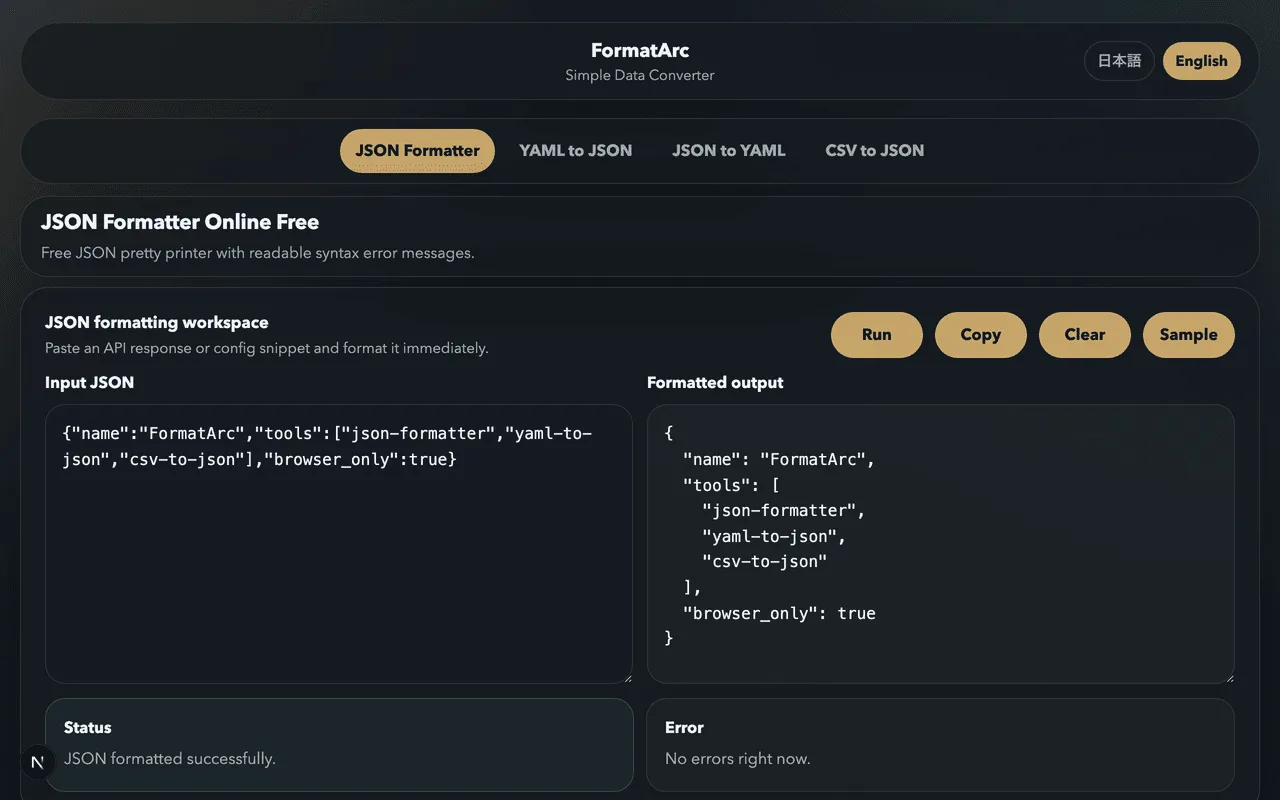
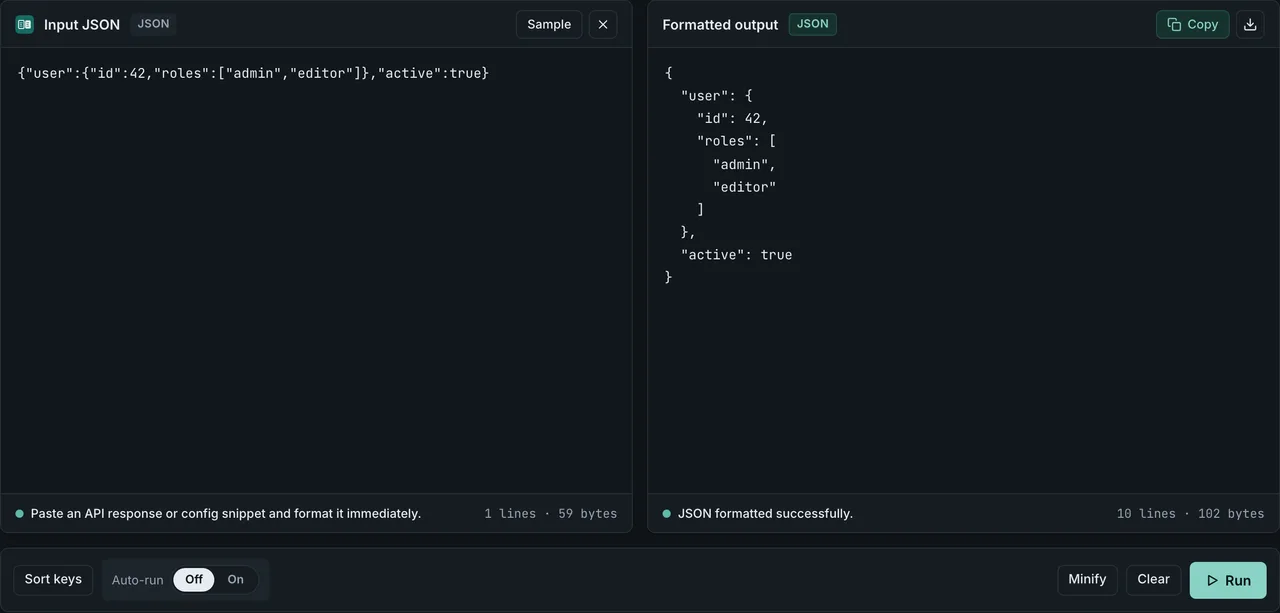
FormatArc's JSON Formatter lets you pretty-print JSON entirely in the browser. Your data is never sent to a server, making it safe for API payloads and internal configs.
How to use it
- Paste your JSON into the input area
- Click "Run"
- Copy the formatted output
Three simple steps to clean, readable JSON.
Validate JSON before formatting
If your JSON is malformed, pretty-printing will fail. The most common causes are trailing commas, single quotes, and unquoted keys (covered above). If you need comments in your config files, see JSONC, JSON5, and other workarounds. When you run into a parse error, the error message usually includes a character position — but that can be hard to map to the actual problem in a large file.
FormatArc's JSON Formatter shows the approximate line number where the error occurred, making it easier to jump to the right spot. For a deeper walkthrough of common parse errors and how to fix them, see How to Fix JSON Parse Errors.
Auto-format JSON with a Chrome extension
If you often open API endpoints directly in the browser, a Chrome extension can auto-format the response for you. See Top JSON Formatter Chrome Extensions Compared for a breakdown of JSONView, JSON Formatter, and other popular options.
Working with other data formats
JSON formatting is often part of a larger workflow that involves converting between formats:
- YAML vs JSON — understand when to use each format
- Convert YAML to JSON — turn Kubernetes configs and CI files into JSON
- Convert CSV to JSON — transform spreadsheet exports into JSON arrays
- JSON Syntax Guide — the fundamentals of writing valid JSON
- Using formatarc as an npm Package — format JSON from the terminal with the formatarc CLI
- Pretty-Print curl JSON Responses — format API responses directly from curl with jq or python one-liners
Try it now
Have messy JSON that needs formatting? Open the JSON Formatter, paste your data, and get clean output instantly. No signup, no server — everything stays in your browser.
Summary
- JSON pretty-printing is an everyday task in development and operations
- Use
JSON.stringify(data, null, 2)to pretty-print JSON in JavaScript - In the terminal, pipe JSON through
jqorpython3 -m json.tool - The most common syntax errors are trailing commas, single quotes, and unquoted keys
- FormatArc formats JSON safely in the browser with no server involved