TL;DR — pick a method in 10 seconds
- Need it right now, no install → FormatArc YAML to JSON (browser-side, no upload, validates as it converts, line-numbered errors)
- CLI / one-liner →
yq -o=json '.' file.yaml(the DevOps default) - Python script or pipeline →
python3 -c 'import sys, yaml, json; json.dump(yaml.safe_load(sys.stdin), sys.stdout, indent=2)' < file.yaml - Node.js application →
js-yaml(yaml.load) +JSON.stringify - Go service →
gopkg.in/yaml.v3+encoding/json - Kubernetes round-trip →
kubectl get ... -o json | yq -P '.'(back to YAML) - Multi-document YAML (
---separators) →yq -o=json '.' file.yaml(yq splits by default) or NDJSON output
| Method | Setup | Multi-document | Anchors | Comments | Streaming |
|---|---|---|---|---|---|
| FormatArc browser | None | First doc only | Expanded | Lost (JSON limit) | No |
yq -o=json | brew install yq | All docs (split or wrap) | Expanded | Lost | Yes |
Python yaml.safe_load + json.dump | pip install pyyaml | First doc (safe_load) / all docs (safe_load_all) | Expanded | Lost | Manual loop |
Node js-yaml yaml.load | npm install js-yaml | First doc (load) / all docs (loadAll) | Expanded | Lost | Manual |
Go yaml.Unmarshal | go get gopkg.in/yaml.v3 | First doc / all docs (Decoder loop) | Expanded | Lost | Yes |
Most YAML-to-JSON conversion is one line of code. The hard parts are the 8 gotchas (Norway problem, comments lost, multi-document handling, yaml.load being unsafe, integer keys becoming strings, anchor expansion, 1.0 becoming float, type inference surprises) that this guide explains with verified before/after examples.
Why convert YAML to JSON?
A few common scenarios:
- Kubernetes API submission: You have a YAML manifest, but you need to POST it via the Kubernetes API which accepts only JSON-encoded bodies.
- Debugging YAML structure: YAML's indentation-based nesting is sometimes ambiguous — converting to JSON makes the structure unambiguous. A misplaced
-or indent jumps out immediately in JSON. - JSON-only tooling: Your downstream tool (a JSON parser in another language, a database that stores JSON, an event bus with a JSON schema validator) does not accept YAML.
- Configuration audit: Convert YAML configs from a repo to JSON for diff analysis, schema validation against JSON Schema, or feeding into security scanners.
- LLM context: Feed configs to an LLM as JSON — the model treats JSON object boundaries more reliably than YAML indentation, especially for nested structures. See Markdown vs HTML for LLMs for the format-choice playbook.
- Scripting an OpenAPI/Swagger spec with
jq:jqis a JSON processor and does not parse YAML directly, so querying or editing a YAML-based OpenAPI/Swagger spec through ajqpipeline requires converting it to JSON first.
Understanding the differences between YAML and JSON helps avoid surprises during conversion. See YAML vs JSON for a deep comparison.
Method 1: FormatArc browser tool (no upload)
For quick, one-off conversions without installing anything, the YAML to JSON converter is the simplest option. It runs entirely in your browser — no data leaves your machine.
- Open the YAML to JSON tool.
- Paste your YAML into the left panel.
- Click Convert. The JSON output appears in the right panel.
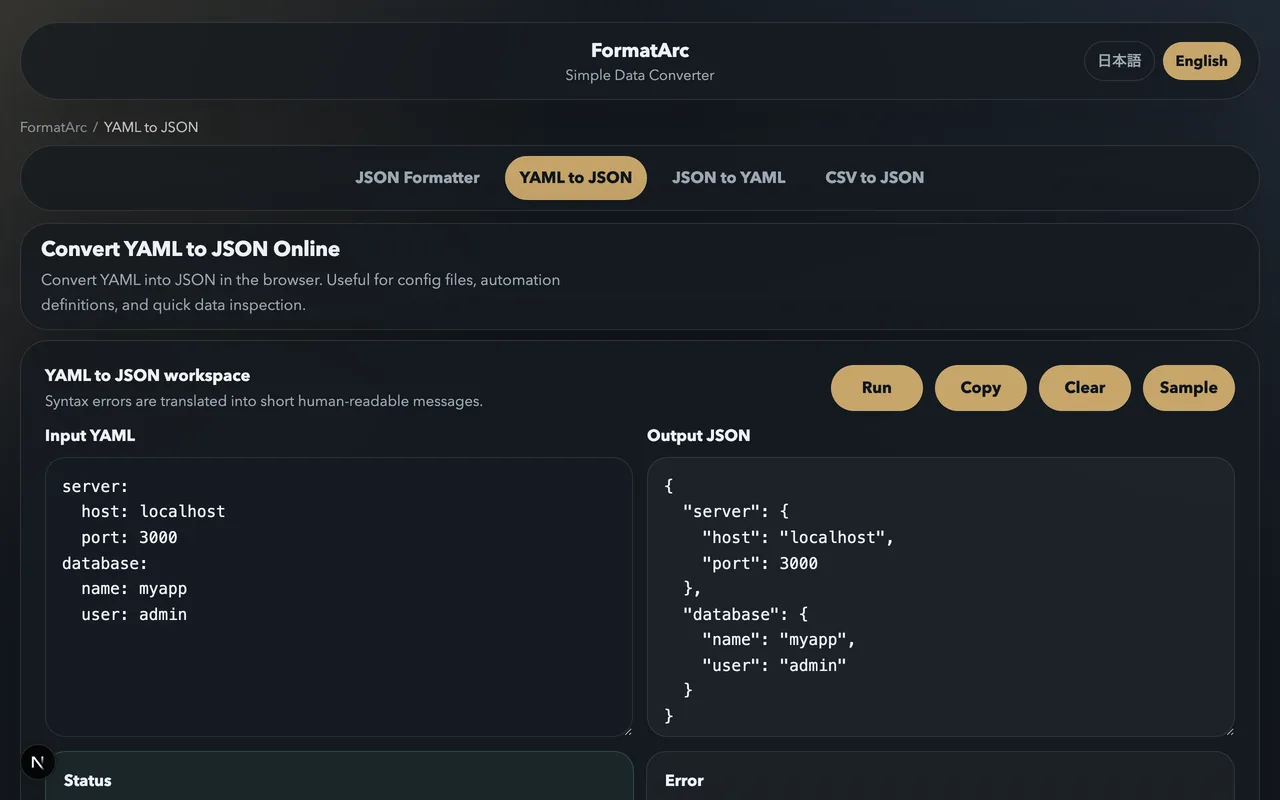
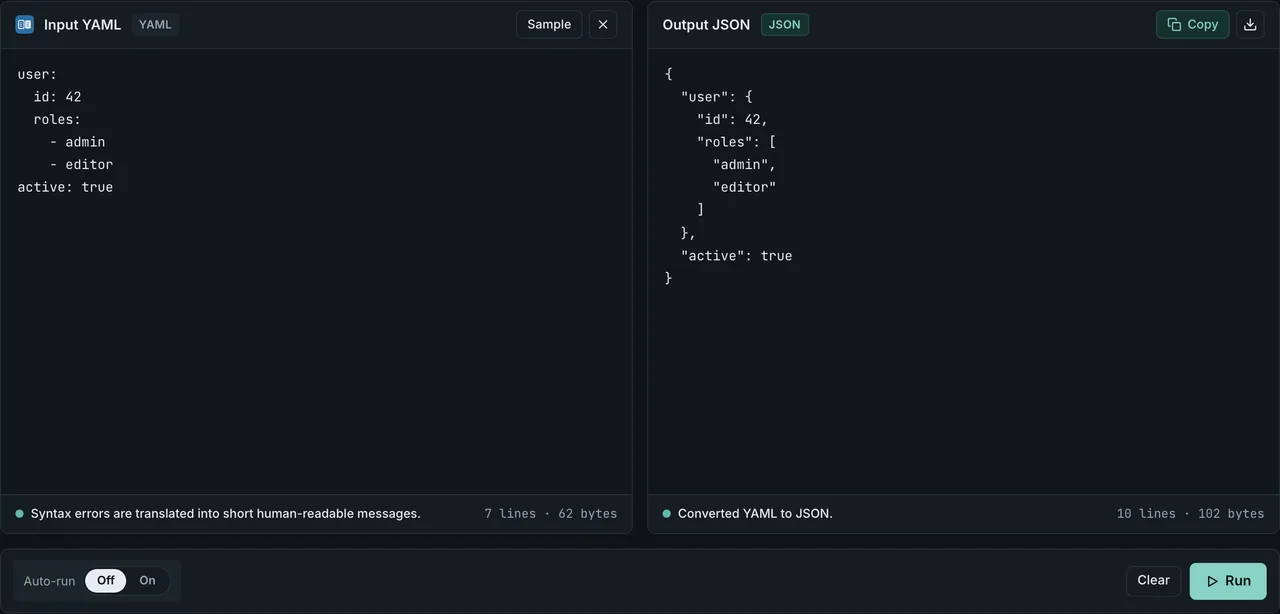
The tool validates your YAML as it converts. Syntax errors — wrong indentation, missing colons, tabs where spaces are expected — are reported with line numbers, which makes it useful for debugging YAML files even when conversion is not the main goal.
Browser-side conversion matters when the YAML contains sensitive data: Kubernetes Secrets (yes, the data is base64-encoded but still confidential), cloud provider credentials in Ansible vault files, internal CI configs with API tokens. Nothing leaves the tab.
This is not a theoretical concern. In November 2025, security firm watchTowr found that the popular formatting sites JSONFormatter and CodeBeautify had exposed 5GB+ of saved user data — including credentials, private keys, and API tokens — through a save feature that left stored input publicly browsable (watchTowr's reportOpens in a new tab). A browser-side tool has nothing to expose because it never stores or transmits your input.
See Are online JSON converters safe? for how to check before pasting.
The browser tool handles: multiline strings (both block scalar | and folded scalar > styles), anchors and aliases (expanded inline), nested structures of arbitrary depth, arrays of mixed types, null values, booleans, and numeric types.
Method 2: yq (the DevOps default)
yq is a lightweight command-line YAML processor — think jq but for YAML. It is by far the most common tool for YAML-to-JSON conversion in DevOps pipelines.
# Basic conversion
yq -o=json '.' input.yaml

# Pipe from stdin
cat config.yaml | yq -o=json '.'

# Save to file
yq -o=json '.' config.yaml > config.json

# Compact output (single line)
yq -o=json -I=0 '.' config.yaml

# Extract a sub-tree while converting
yq -o=json '.spec.template' deployment.yaml

# Convert and apply a filter
yq -o=json '.items[] | select(.kind == "ConfigMap")' multi.yaml
Install:
# macOS
brew install yq

# Linux (snap)
snap install yq

# Linux (binary download)
sudo wget -qO /usr/local/bin/yq https://github.com/mikefarah/yq/releases/latest/download/yq_linux_amd64
sudo chmod +x /usr/local/bin/yq

# Go install
go install github.com/mikefarah/yq/v4@latest
Note: There are two competing tools both called yq. This guide uses Mike Farah's Go-based yq (used everywhere in Kubernetes / CNCF tooling). The Python yq by kislyuk uses different syntax — both work, but the Go version is the de facto standard in 2026.
yq with JSON Lines (multi-document YAML)
# Multi-document YAML file (multiple documents separated by ---)
yq -o=json '.' multi.yaml          # outputs one JSON document per input doc
yq -o=json -I=0 '.' multi.yaml      # NDJSON (compact, one line each)
yq eval-all '[.]' -o=json multi.yaml  # wrap all docs in a single JSON array
This is the cleanest way to convert Kubernetes "list of resources" files into a single JSON array for batch API operations.
Method 3: Python (the most flexible)
Python ships with a JSON module in its standard library, and pyyaml is installed by default on most systems (or via pip install pyyaml).
Python one-liner
python3 -c 'import sys, yaml, json; json.dump(yaml.safe_load(sys.stdin), sys.stdout, indent=2)' < input.yaml > output.json
This reads YAML from stdin, parses it with yaml.safe_load, and writes formatted JSON to stdout. The indent=2 argument produces readable output.
Python script (multi-document, error handling)
import sys
import yaml
import json

with open("config.yaml") as f:
    data = yaml.safe_load(f)  # use safe_load_all() for multi-document

with open("config.json", "w") as f:
    json.dump(data, f, indent=2, ensure_ascii=False)
yaml.safe_load is important — it prevents arbitrary code execution that yaml.load allows. Always use the safe variant unless you have a specific reason not to (see gotcha #4 below).
Python with ruamel.yaml (preserves more structure)
For more advanced needs, ruamel.yaml preserves quoting style, key order, and even comments (though comments still cannot survive into JSON):
from ruamel.yaml import YAML
import json
import sys

yaml_parser = YAML(typ="safe")
data = yaml_parser.load(open(sys.argv[1]))
json.dump(data, sys.stdout, indent=2, ensure_ascii=False)
For most use cases, pyyaml.safe_load is enough. Use ruamel.yaml if you need round-trip preservation of YAML formatting.
Method 4: Node.js (js-yaml)
The js-yaml package is the standard choice for Node.js applications.
const fs = require("fs");
const yaml = require("js-yaml");

// Single document
const doc = yaml.load(fs.readFileSync("config.yaml", "utf8"));
fs.writeFileSync("config.json", JSON.stringify(doc, null, 2));

// Multi-document
const docs = yaml.loadAll(fs.readFileSync("multi.yaml", "utf8"));
fs.writeFileSync("multi.json", JSON.stringify(docs, null, 2));
Install: npm install js-yaml or yarn add js-yaml.
For untrusted YAML input, use yaml.load(text, { schema: yaml.JSON_SCHEMA }) to restrict to JSON-compatible types only. The default DEFAULT_SCHEMA includes some YAML 1.1 quirks like the Norway problem.
Method 5: Go (gopkg.in/yaml.v3)
package main

import (
    "encoding/json"
    "fmt"
    "os"

    "gopkg.in/yaml.v3"
)

func main() {
    data, _ := os.ReadFile("config.yaml")
    var obj interface{}
    yaml.Unmarshal(data, &obj)
    result, _ := json.MarshalIndent(obj, "", "  ")
    fmt.Println(string(result))
}
yaml.v3 is the version maintained by go-yaml (the one used by Kubernetes itself). One caveat: YAML integer keys (123: foo) get converted to strings in JSON, since JSON only supports string keys (see gotcha #5).
For streaming multi-document YAML files, use yaml.NewDecoder in a loop:
dec := yaml.NewDecoder(file)
for {
    var doc interface{}
    if err := dec.Decode(&doc); err != nil {
        if err == io.EOF { break }
        log.Fatal(err)
    }
    out, _ := json.Marshal(doc)
    fmt.Println(string(out))   // NDJSON: one document per line
}
This handles arbitrarily large multi-document YAML files with constant memory.
YAML conversion gotchas — 8 verified cases
YAML and JSON do not have a perfect one-to-one mapping. These are the things that bite people most often.
Gotcha 1: The Norway problem (NO → false)
YAML 1.1 interprets certain bare strings as booleans:
country: NO
Becomes:
{ "country": false }
NO, no, Off, OFF, n, N, False, False, f, F all become false. YES, Y, On, True, T, t all become true. This is the famous "Norway problem" — country: NO in a list of country codes silently parses as a boolean.
Fix: quote ambiguous values in your YAML:
country: "NO"
YAML 1.2 (specifically the Core schema) removed this behavior. But many tools still default to YAML 1.1, including PyYAML's safe_load and yq up to v4. Always quote two-letter country codes, version strings like 1.0, and any user-controlled string fields.
Gotcha 2: Comments are silently lost
YAML supports comments with #. JSON does not. Any comments in your YAML file are dropped during conversion:
# Production database connection (DO NOT CHANGE)
host: db.prod.internal
port: 5432  # standard PostgreSQL port
Becomes:
{ "host": "db.prod.internal", "port": 5432 }
No converter can preserve YAML comments in JSON because JSON does not have a comment syntax. JSON5 and JSONC do, but they are not standard. If the comments are important, save them separately or use a tool like ruamel.yaml to extract them programmatically before conversion.
Gotcha 3: Multi-document YAML (---) — only the first document survives by default
YAML files can contain multiple documents separated by ---:
---
apiVersion: v1
kind: ConfigMap
metadata:
  name: app-config
---
apiVersion: v1
kind: Service
metadata:
  name: app-service
Default behavior:
yaml.safe_load(Python): returns only the first document silentlyyaml.load(js-yaml): same, returns only the firstyq -o=json '.': emits multiple JSON documents back-to-back (concatenated, valid NDJSON if compact)
To get all documents as a JSON array:
yq eval-all '[.]' -o=json multi.yaml
Python:
import yaml, json
docs = list(yaml.safe_load_all(open("multi.yaml")))
json.dump(docs, open("multi.json", "w"), indent=2)
Node.js:
const docs = yaml.loadAll(fs.readFileSync("multi.yaml", "utf8"));
fs.writeFileSync("multi.json", JSON.stringify(docs, null, 2));
Kubernetes "list of manifests" files almost always use multi-document YAML. Handle this case explicitly.
Gotcha 4: yaml.load is unsafe — always use safe_load
In Python's PyYAML, the default yaml.load function allows arbitrary Python object construction:
!!python/object/apply:os.system ["rm -rf /"]
A maliciously crafted YAML file can execute code if loaded with yaml.load. Always use yaml.safe_load (or yaml.safe_load_all for multi-document) when handling untrusted input.
js-yaml mitigated this by deprecating yaml.safeLoad in favor of yaml.load, but yaml.load in js-yaml is safe by default. The deprecated unsafeLoad is the dangerous one. The naming is confusingly different between Python and Node — always check.
yq is safe because it uses Go's yaml.v3, which has no equivalent to Python's !!python/object tag.
Gotcha 5: Integer keys become strings
YAML allows integer keys:
123: first
456: second
JSON object keys must be strings, so converters cast them:
{ "123": "first", "456": "second" }
This is usually fine, but if your downstream code expects to lookup by integer key (obj[123]), it will fail because the key is now a string (obj["123"]). Convert the keys back to integers in your application code if needed.
Gotcha 6: Anchors and aliases are expanded inline
YAML lets you define a value once with &anchor and reference it elsewhere with *alias:
defaults: &defaults
  timeout: 30
  retries: 3

production:
  <<: *defaults
  host: prod.internal

staging:
  <<: *defaults
  host: stage.internal
When converted to JSON, the anchor is expanded inline — both production and staging end up with a full copy of every default:
{
  "defaults": { "timeout": 30, "retries": 3 },
  "production": { "timeout": 30, "retries": 3, "host": "prod.internal" },
  "staging": { "timeout": 30, "retries": 3, "host": "stage.internal" }
}
The data is correct, but the original intent of "these share defaults" is no longer visible. If you convert back to YAML, you lose the anchors entirely. This is unavoidable — JSON has no equivalent to anchors.
Gotcha 7: 1.0 becomes a float (version strings break)
YAML treats numeric-looking values as numbers:
version: 1.0
release: 2026
Becomes:
{ "version": 1.0, "release": 2026 }
If you wanted the string "1.0" (a version label), the conversion silently coerces it to a float 1.0, which then prints as just 1 or 1.0 depending on the JSON encoder. Major version comparisons (if version == "1.0") will fail.
Fix: quote version strings in YAML:
version: "1.0"
release: "2026"
This applies to anything that should remain a string but happens to look numeric: phone numbers, ZIP codes ("01234" loses the leading zero), commit hashes that look like hex numbers ("e10" → 1e+10).
Gotcha 8: Type inference surprises by schema
YAML has three standard schemas that determine how types are inferred:
- FailSafe schema: only strings, sequences, mappings. No numeric or boolean parsing. Safest.
- JSON schema: matches JSON's types (strings, numbers, booleans, null, arrays, objects). No Norway problem, no
yes/nobooleans. - Core schema (YAML 1.2 default): like JSON but adds
null,Null,NULL,~, and empty as null. Also allowstrue/false/True/False/TRUE/FALSEas booleans.
Most tools default to Core. Some legacy tools default to YAML 1.1's full schema (which includes Norway problem and yes/no).
To force JSON schema in Python:
yaml.safe_load(text, Loader=yaml.SafeLoader)  # default
# or be explicit:
yaml.load(text, Loader=yaml.CSafeLoader)
js-yaml:
yaml.load(text, { schema: yaml.JSON_SCHEMA });
yq v4 uses YAML 1.2 Core schema by default, which avoids the Norway problem.
Online tool comparison
A practical comparison of common online YAML-to-JSON converters in 2026:
| Tool | Browser-side | File upload | Multi-doc YAML | Line-numbered errors | Free of ads |
|---|---|---|---|---|---|
| FormatArc YAML to JSON | Yes | No (paste only) | First doc | Yes | Yes |
| onlineyamltools.com | Yes (claimed) | Yes | First doc | Limited | Yes |
| jsonformatter.org | Yes (claimed) | Yes | First doc | No | No (ads) |
| codebeautify.org | Yes (claimed) | Yes | First doc | No | No (ads) |
| jsonlint.com | Yes | No | First doc | Yes | Yes |
| dadroit.com | Yes | Yes | First doc | Limited | Yes |
For sensitive YAML (Kubernetes Secrets, Ansible vault contents, CI configs with tokens), the "browser-side" claim matters. Verify by disabling network in DevTools before pasting — a true browser-side tool keeps working with no network. FormatArc keeps working with the network disabled.
For multi-document YAML, all listed online tools handle only the first document. For multi-document or NDJSON output, fall back to yq or Python.
YAML to JSON Lines (NDJSON) for streaming pipelines
When the input is a multi-document YAML file and the output needs to feed into a streaming consumer (Kafka producer, line-by-line database loader, log shipper), JSON Lines (NDJSON) is the right output format.
With yq
# NDJSON: each YAML document becomes one JSON line
yq -o=json -I=0 '.' multi.yaml

# Filter then NDJSON
yq -o=json -I=0 '.items[]' kubernetes-list.yaml
With Python streaming
import yaml
import json
import sys

for doc in yaml.safe_load_all(sys.stdin):
    sys.stdout.write(json.dumps(doc, ensure_ascii=False) + "\n")
Usage: python3 yaml2ndjson.py < multi.yaml > multi.ndjson.
This consumes constant memory regardless of input size — important for log-style YAML files with thousands of documents.
Pipe to Kafka, BigQuery, or S3
# Stream to BigQuery
yq -o=json -I=0 '.' events.yaml | bq load --source_format=NEWLINE_DELIMITED_JSON dataset.events -

# Stream to S3
yq -o=json -I=0 '.' events.yaml | aws s3 cp - s3://bucket/events.ndjson

# Stream to Kafka via kafkacat
yq -o=json -I=0 '.' events.yaml | kafkacat -P -b broker:9092 -t events
CI/CD automation
Three common pipeline platforms with YAML-to-JSON conversion steps.
GitHub Actions
name: Convert YAML config to JSON
on: [push, pull_request]

jobs:
  convert:
    runs-on: ubuntu-latest
    steps:
      - uses: actions/checkout@v4
      - name: Install yq
        run: |
          sudo wget -qO /usr/local/bin/yq https://github.com/mikefarah/yq/releases/latest/download/yq_linux_amd64
          sudo chmod +x /usr/local/bin/yq
      - name: Convert
        run: yq -o=json '.' config.yaml > config.json
      - name: Validate against JSON Schema
        run: |
          npx ajv-cli validate -s schema.json -d config.json
GitLab CI
convert-yaml:
  image: mikefarah/yq:latest
  stage: validate
  script:
    - yq -o=json '.' config.yaml > config.json
    - jq empty config.json   # final syntax check
  artifacts:
    paths:
      - config.json
Jenkins (declarative pipeline)
pipeline {
  agent any
  stages {
    stage('Convert YAML to JSON') {
      steps {
        sh 'yq -o=json . config.yaml > config.json'
        sh 'jq empty config.json'
      }
    }
  }
}
Either way the conversion is a single command you can drop into the middle of a pipeline.
Kubernetes practical workflow
A typical real-world scenario. You have a running deployment, you want to inspect or modify it, and you need to convert between YAML and JSON.
# Get the current deployment as JSON (kubectl supports both)
kubectl get deployment web-app -o json > deployment.json

# Or get as YAML, then convert (verifies your local yq tooling)
kubectl get deployment web-app -o yaml | yq -o=json '.' > deployment.json

# Modify with jq (e.g. scale replicas)
jq '.spec.replicas = 5' deployment.json > updated.json

# Convert back to YAML for committing to Git
yq -P '.' updated.json > deployment.yaml

# Apply
kubectl apply -f deployment.yaml
Or in a single pipeline:
kubectl get deployment web-app -o json \
  | jq '.spec.replicas = 5' \
  | yq -P '.' \
  > deployment.yaml
This pattern works across all kubectl resources, Helm chart values, and custom resource definitions.
Frequently asked questions
Why did my YAML value country: NO become false?
This is the famous "Norway problem." YAML 1.1 interprets NO, Off, n, False, and similar bare strings as the boolean false. Fix by quoting: country: "NO". The YAML 1.2 spec removed this behavior, but many tools still default to 1.1. yq v4 uses YAML 1.2 Core schema and does not have this bug.
Can I preserve YAML comments in the JSON output?
No. JSON has no comment syntax. Workarounds include ruamel.yaml to extract comments as a separate metadata structure, or non-standard formats like JSON5 / JSONC. If comments are important, keep the YAML as the source of truth. See How to add comments to JSON for workarounds within JSON itself.
Multi-document YAML — what happens during conversion?
By default, most tools convert only the first document. To get all documents: use yaml.safe_load_all in Python, yaml.loadAll in Node.js, or yq eval-all '[.]' to wrap in a JSON array. For streaming (one JSON document per line), use yq -o=json -I=0 for NDJSON output.
YAML to JSON Lines (NDJSON)?
Use yq -o=json -I=0 '.' multi.yaml for compact one-document-per-line output. Python: stream with yaml.safe_load_all and write each as a line. NDJSON is the right format for streaming consumers (BigQuery, S3, Kafka, log shippers).
YAML to JSON5 (with comments)?
JSON5 is a superset of JSON that allows comments. To convert YAML to JSON5: convert YAML to standard JSON first, then manually add comments back, or use a custom tool. The json5.orgOpens in a new tab reference implementation can parse and emit JSON5, but no major YAML library outputs JSON5 directly.
Anchors and merge keys — preserved in JSON?
No. JSON has no anchor / alias concept, so anchors are expanded inline during conversion. The expanded data is correct, but the original "these share defaults" intent is no longer visible in the JSON. Converting back to YAML loses the anchors entirely.
How do I convert a YAML file to JSON without yq or Python installed?
Use the FormatArc YAML to JSON browser tool — it runs entirely in the browser, no install needed. Alternatively, every modern OS ships with Python 3 (which can use pyyaml after pip install pyyaml). On many Linux distros, python3 -c 'import sys, yaml, json; ...' works out of the box.
Does converting swagger: 2.0 to JSON break the version number?
It can. Writing a two-part version number like swagger: 2.0 or info.version: 1.0 without quotes makes the converted JSON emit a float (2.0) instead of a string. The OpenAPI Specification declares both openapi and info.version as string (OAS 3.1.0Opens in a new tab), so a number there is already off-spec. This is the same failure mode as Gotcha 7 — quote it as swagger: "2.0" to fix it.
Going the other direction
To convert JSON to YAML, see How to convert JSON to YAML. The FormatArc JSON to YAML tool handles the reverse direction with the same ease.
Related guides
- What is YAML — YAML's data model, history, and common use cases
- What is JSON — JSON's data model and types
- YAML syntax guide — writing valid YAML from scratch
- YAML vs JSON — structural comparison and when to use each
- JSON to YAML conversion — the reverse direction
- JSON formatting tips — produce reviewable JSON after conversion
- Markdown frontmatter YAML to JSON — SSG compatibility matrix (Hugo, Jekyll, Astro, Next.js, Eleventy) and the YAML types that break
Summary
Five methods cover every YAML-to-JSON use case:
- No install, sensitive data: FormatArc YAML to JSON — browser-side, line-numbered errors.
- CLI / DevOps pipelines:
yq -o=json '.'— the de facto standard. - Python applications:
yaml.safe_load(neveryaml.load) +json.dump. - Node.js applications:
js-yaml(yaml.loadwith JSON schema for safety). - Go services:
gopkg.in/yaml.v3+encoding/json, with aDecoderloop for multi-document files.
The 8 gotchas (Norway problem, comments lost, multi-document handling, yaml.load unsafety, integer keys becoming strings, anchor expansion, 1.0 becoming float, type inference by schema) catch almost everyone at least once. Quote ambiguous strings, use safe_load, and handle multi-document explicitly — the rest follows.