TL;DR — pick a method in 10 seconds
- Need it right now, no install → FormatArc CSV to JSON (browser-side, no upload, handles UTF-8, quoted commas, embedded newlines)
- Shell scripting / one-liners →
csvjson data.csv(csvkit) ormlr --icsv --ojson cat data.csv(Miller) - Inside a Python app →
csv.DictReader(stdlib, zero deps) orpandas.read_csvfor large files - Inside a Node.js app → PapaParse with
{ header: true, dynamicTyping: true } - Inside a Go service →
encoding/csvplus a small headers→map loop - Large files that don't fit in memory → stream row-by-row with
csv.DictReader+ JSON Lines, neverjson.dumpthe whole list
| Method | Setup | Streams large files | Type inference | NDJSON output |
|---|---|---|---|---|
| FormatArc browser | None | No (loads full file; bounded by browser memory) | No (all strings) | No (use CLI) |
Python csv.DictReader | stdlib | Yes (with manual write loop) | No (all strings) | Yes |
pandas read_csv | pip install pandas | Chunks via chunksize= | Yes (dtype inferred) | Yes (lines=True) |
Miller (mlr) | brew install miller | Yes (streaming) | Yes (--inumeric) | Yes (--ojsonl) |
csvkit (csvjson) | pip install csvkit | No (loads all) | Yes (--no-inference to disable) | No |
| PapaParse (Node) | npm install papaparse | Yes (step callback) | Yes (dynamicTyping) | Yes (manual) |
Go encoding/csv | stdlib | Yes (Read loop) | No (manual cast) | Yes (manual) |
This guide covers each method with working code, then the four things that trip people up: output shape, encoding, type inference, and large-file performance.
CSV format refresher (RFC 4180)
CSV stands for Comma-Separated Values. The format is informally specified by RFC 4180Opens in a new tab but in the wild you will see many variants. A typical CSV file:
name,email,department,start_date
Alice Johnson,alice@example.com,Engineering,2024-01-15
Bob Smith,bob@example.com,Marketing,2023-06-01
Carol Williams,carol@example.com,Engineering,2024-03-10
The first row is usually the header. Each subsequent row is a record. Fields are separated by commas — but the format has well-known quirks:
- Fields containing commas must be wrapped in double quotes:
"Smith, John" - Fields containing double quotes must escape them by doubling:
"She said ""hello""" - Newlines inside quoted fields are valid (and frequently cause problems with naive parsers)
- There is no standard for encoding — you might get UTF-8, Latin-1, Shift-JIS, or UTF-8 with BOM depending on the source (Excel on Windows emits UTF-8 BOM by default)
- The separator character itself is not standardized: TSV uses tabs, European Excel uses
;, some scientific datasets use|
For more background on the format and its history, see What is CSV.
Why convert CSV to JSON?
Several practical reasons come up regularly:
- REST APIs accept JSON request bodies, not CSV. If you have data in a spreadsheet that you need to POST to an API, you need to convert it first.
- Frontend frameworks (React, Vue, Svelte) work naturally with JSON arrays and objects. Parsing CSV in the browser is possible but adds an extra dependency.
- Type preservation: In CSV everything is a string. In JSON you can distinguish between numbers, booleans, strings, and null.
- NoSQL databases like MongoDB, CouchDB, and DynamoDB import JSON Lines (NDJSON) directly via bulk loaders.
- Data pipelines and ETL tools (Apache Airflow, Prefect, Mage, dbt) increasingly expect JSON or NDJSON as an interchange format between stages.
- LLM context: feeding tabular data to an LLM as JSON objects is more reliable than CSV — the model picks up keys consistently. See Markdown vs HTML for LLMs for the format-choice playbook.
Understanding both formats helps you make informed decisions. See What is JSON for a thorough look at JSON's structure and capabilities.
5 output shapes you might want
Most CSV-to-JSON converters output exactly one shape: an array of objects with header values as keys. That shape does not fit every consumer. Here is the same CSV in all five shapes so you can pick the right one.
Input:
id,name,score
1,Alice,95
2,Bob,87
3,Carol,92
Pick by what consumes the output, not by what your converter defaults to:
| Shape | JSON structure | Choose it when | Produce with |
|---|---|---|---|
| Array of objects | [{...}, {...}] | A REST API or a frontend component consumes the rows as a list | A common converter default |
| Keyed object | {"id": {...}} | You look rows up by ID instead of iterating them | Python dict comprehension |
| JSON Lines (NDJSON) | one object per line, no wrapping array | The file is too large to hold in memory, or a warehouse bulk loader reads it | mlr --ojsonl for large files; jq -c '.[]' only if you already hold the whole array in memory |
| Column-oriented | {"col": [v1, v2]} | Python code on the other end expects a dict of column-wise lists | df.to_dict(orient="list") |
| Nested | [{"a": {"b": v}}] | An API request body expects nested objects | Slash-delimited headers plus post-processing |
Shape 1: Array of objects (default for most tools)
[
  { "id": 1, "name": "Alice", "score": 95 },
  { "id": 2, "name": "Bob", "score": 87 },
  { "id": 3, "name": "Carol", "score": 92 }
]
Best for: REST APIs, frontend rendering, generic data exchange.
Shape 2: Keyed object (column as primary key)
{
  "1": { "name": "Alice", "score": 95 },
  "2": { "name": "Bob", "score": 87 },
  "3": { "name": "Carol", "score": 92 }
}
Best for: lookup tables, dictionary-based access by ID. Produce with Python:
import csv, json, sys
rows = list(csv.DictReader(sys.stdin))
result = {row["id"]: {k: v for k, v in row.items() if k != "id"} for row in rows}
json.dump(result, sys.stdout, indent=2)
Shape 3: JSON Lines / NDJSON (newline-delimited JSON)
{"id":1,"name":"Alice","score":95}
{"id":2,"name":"Bob","score":87}
{"id":3,"name":"Carol","score":92}
Best for: streaming ingest (BigQuery, Snowflake COPY INTO, MongoDB mongoimport --type=json, log pipelines, Kafka producers). Each line is independently parseable, so you can process a 10 GB file row-by-row without loading it all into memory.
Produce with Miller: mlr --icsv --ojsonl cat data.csv. Or with jq: jq -c '.[]' array.json > lines.ndjson.
Shape 4: Column-oriented (parallel arrays)
{
  "id": [1, 2, 3],
  "name": ["Alice", "Bob", "Carol"],
  "score": [95, 87, 92]
}
Best for: data science (matches the Apache Arrow / pandas internal layout), GPU pipelines, columnar databases. Produce with pandas: df.to_dict(orient="list").
Shape 5: Nested via slash-delimited headers
Input CSV with slash-delimited header names:
id,name,address/city,address/zip
1,Alice,Tokyo,150-0001
2,Bob,Osaka,530-0001
Output (nested):
[
  { "id": 1, "name": "Alice", "address": { "city": "Tokyo", "zip": "150-0001" } },
  { "id": 2, "name": "Bob",   "address": { "city": "Osaka", "zip": "530-0001" } }
]
Best for: producing API request bodies that expect nested structures. Most tools require post-processing (see Nested JSON output below).
Method 1: FormatArc browser tool (no upload)
If you need to convert a CSV file right now without installing anything, the CSV to JSON tool is the fastest route. It runs entirely in your browser — your data never leaves your machine.
- Open CSV to JSON.
- Paste your CSV into the left panel.
- Click Convert. The JSON output appears in the right panel.
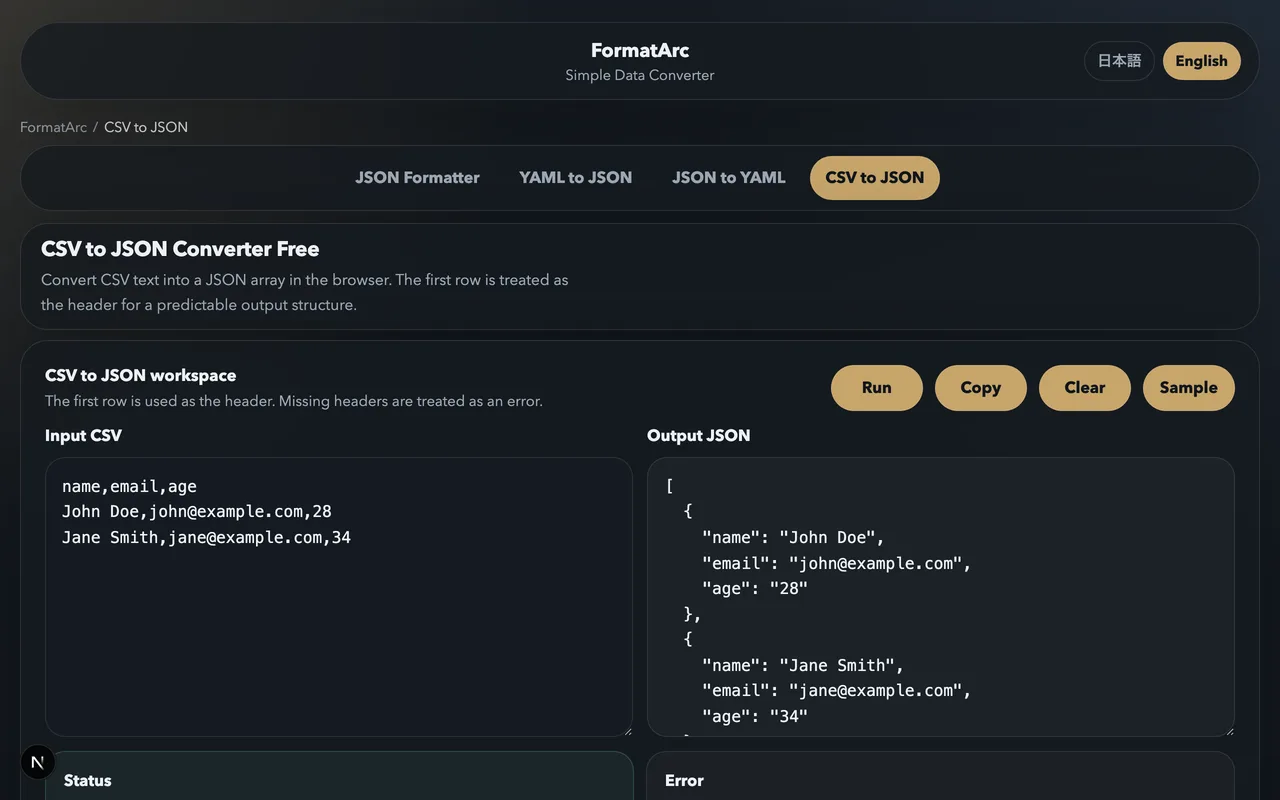
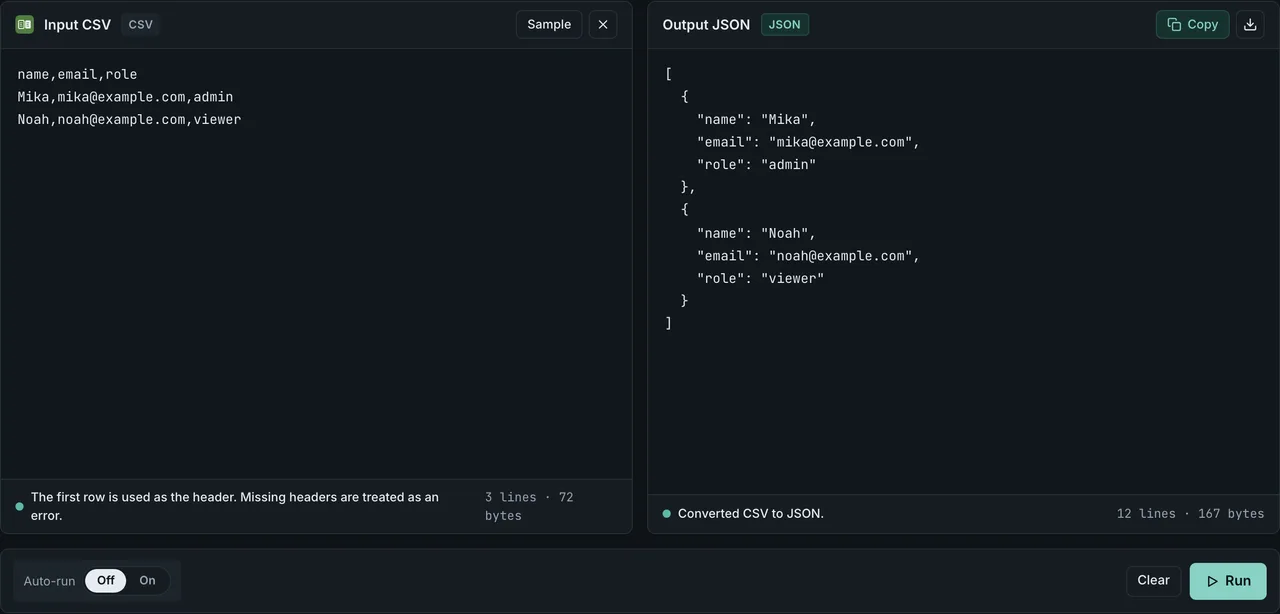
The tool handles edge cases that trip up simpler converters: quoted fields with embedded commas, fields containing newlines, empty fields (converted to empty strings), and large datasets, bounded by how much your browser has available in memory.
Browser-side conversion matters when the CSV contains sensitive data: customer records, salary tables, API keys exported from a vault, internal financial figures. Anything you paste stays in the browser tab. There is no upload step and no server-side processing.
Method 2: Python — csv.DictReader and pandas
Python ships with csv and json in its standard library, so no third-party packages are needed for basic conversion:
import csv
import json
import sys

reader = csv.DictReader(sys.stdin)
rows = list(reader)
json.dump(rows, sys.stdout, indent=2, ensure_ascii=False)
Save as csv2json.py and run:
python3 csv2json.py < data.csv > data.json
csv.DictReader uses the first row as headers automatically. Each row becomes a dict, and the list of dicts maps to a JSON array of objects. ensure_ascii=False is important if your CSV contains non-ASCII characters (Japanese, accented Latin, emoji) — without it, those characters are escaped as あ sequences.
Python with pandas (large files and type inference)
import pandas as pd

df = pd.read_csv("data.csv", encoding="utf-8")
df.to_json("data.json", orient="records", indent=2, force_ascii=False)
orient="records" produces array-of-objects. Other useful orients: "index" (keyed object), "columns" (column-oriented), "values" (array of arrays).
For files that do not fit in memory, use chunksize to stream:
import pandas as pd

with open("output.ndjson", "w") as out:
    for chunk in pd.read_csv("huge.csv", chunksize=10000):
        chunk.to_json(out, orient="records", lines=True, force_ascii=False)
        out.write("\n")
This produces NDJSON output and never holds more than 10,000 rows in memory at once.
Method 3: Node.js — PapaParse
The papaparse library is the de facto standard for CSV parsing in JavaScript. It is also what FormatArc uses internally for the browser tool.
const Papa = require("papaparse");
const fs = require("fs");

const csv = fs.readFileSync("data.csv", "utf8");
const result = Papa.parse(csv, {
  header: true,
  dynamicTyping: true,   // "42" → 42, "true" → true
  skipEmptyLines: true,
});

fs.writeFileSync("data.json", JSON.stringify(result.data, null, 2));
For large files, PapaParse supports streaming with a step callback:
const fs = require("fs");
const Papa = require("papaparse");

const stream = fs.createReadStream("huge.csv");
const out = fs.createWriteStream("huge.ndjson");

Papa.parse(stream, {
  header: true,
  dynamicTyping: true,
  step: (row) => out.write(JSON.stringify(row.data) + "\n"),
  complete: () => out.end(),
});
Each row is written to disk immediately, so memory stays flat even on multi-gigabyte files.
Method 4: Go — encoding/csv
package main

import (
    "encoding/csv"
    "encoding/json"
    "fmt"
    "os"
)

func main() {
    f, _ := os.Open("data.csv")
    defer f.Close()
    reader := csv.NewReader(f)
    records, _ := reader.ReadAll()

    headers := records[0]
    result := make([]map[string]string, 0, len(records)-1)
    for _, row := range records[1:] {
        obj := make(map[string]string, len(headers))
        for i, val := range row {
            obj[headers[i]] = val
        }
        result = append(result, obj)
    }

    out, _ := json.MarshalIndent(result, "", "  ")
    fmt.Println(string(out))
}
Go's encoding/csv treats every field as a string — there is no built-in type inference. If you need typed output, parse the values manually (strconv.Atoi, strconv.ParseFloat, strconv.ParseBool).
For streaming large files, replace ReadAll() with a for loop calling Read() per row and encode each row to NDJSON via json.Marshal.
Method 5: Miller and csvkit (one-liners)
For shell scripting and ad-hoc work, two tools deliver CSV-to-JSON in a single command.
Miller (mlr)
Miller is a streaming data processor — think awk for structured data:
# Array of objects
mlr --icsv --ojson cat data.csv > data.json

# NDJSON (streaming-safe)
mlr --icsv --ojsonl cat data.csv > data.ndjson

# Filter and convert in one pass
mlr --icsv --ojson filter '$score > 90' data.csv

# Add a computed column during conversion
mlr --icsv --ojson put '$grade = $score >= 90 ? "A" : "B"' data.csv
Install: brew install miller (macOS) or apt install miller (Debian/Ubuntu).
csvkit (csvjson)
csvkit is a Python suite of CSV tools:
pip install csvkit
csvjson data.csv > data.json
Useful options:
--indent 2— formatted output--no-inference— keep all values as strings (do not auto-cast numbers)--stream— emit NDJSON instead of an array--locale ja_JP.UTF-8— for locale-sensitive number parsing
csvjson --stream is the simplest path to NDJSON without writing code.
Nested JSON output via slash-delimited headers
Most converters produce flat objects. If your downstream consumer (REST API, Mongo schema, GraphQL resolver) expects nested objects, you need a post-processing step.
A common convention is to encode nesting in the header with a separator like / or .:
id,name,address/city,address/zip,address/country
1,Alice,Tokyo,150-0001,JP
2,Bob,Osaka,530-0001,JP
Convert and nest with Python:
import csv, json, sys

def nest(row, sep="/"):
    result = {}
    for key, val in row.items():
        parts = key.split(sep)
        cursor = result
        for part in parts[:-1]:
            cursor = cursor.setdefault(part, {})
        cursor[parts[-1]] = val
    return result

reader = csv.DictReader(sys.stdin)
rows = [nest(r) for r in reader]
json.dump(rows, sys.stdout, indent=2, ensure_ascii=False)
Output:
[
  { "id": "1", "name": "Alice", "address": { "city": "Tokyo", "zip": "150-0001", "country": "JP" } },
  { "id": "2", "name": "Bob",   "address": { "city": "Osaka", "zip": "530-0001", "country": "JP" } }
]
For dot-notation (address.city instead of address/city), swap the separator. The convertcsv.com website popularized this convention with / and supports up to 10 levels of nesting.
Handling encoding (Shift-JIS / BOM / quoted commas / embedded newlines)
Encoding mismatches are the single most common cause of garbled CSV-to-JSON output.
UTF-8 with BOM
Excel on Windows saves "UTF-8 CSV" with a Byte Order Mark (BOM) — three bytes (EF BB BF) at the start of the file. Most JSON parsers do not strip the BOM, so the first key in the output ends up as name instead of name.
Strip in Python:
with open("data.csv", encoding="utf-8-sig") as f:  # -sig strips the BOM
    reader = csv.DictReader(f)
Strip with Miller: mlr --icsv --ojson cat <(sed '1s/^\xEF\xBB\xBF//' data.csv).
Shift-JIS (Japanese Excel default)
Japanese Excel saves CSV as Shift-JIS unless you explicitly choose "CSV UTF-8". If you see �� mojibake in the output, the encoding is wrong:
with open("data.csv", encoding="shift-jis") as f:
    reader = csv.DictReader(f)
To convert in one step at the shell: iconv -f SHIFT-JIS -t UTF-8 data.csv > data.utf8.csv.
In the FormatArc browser tool, paste UTF-8 text directly. For Shift-JIS files, convert to UTF-8 first with iconv or your text editor's "Save As" dialog.
Latin-1 (European Excel default)
Excel for many European locales saves as Latin-1 (Windows-1252). Treat the same as Shift-JIS: convert with iconv -f LATIN1 -t UTF-8 or specify encoding="latin-1" in Python.
Quoted commas and embedded newlines
Fields containing the delimiter character must be quoted:
id,description
1,"Hello, world"
2,"Multi-line
description here"
A naive parser splits on every comma and breaks on the second row. Use a proper CSV parser (DictReader, PapaParse, Miller, csvkit) — all of them handle quoting and embedded newlines correctly. Hand-rolled string.split(",") does not.
Non-comma delimiters (;, tabs, pipes)
European Excel often uses ;. Specify the delimiter explicitly:
reader = csv.DictReader(f, delimiter=";")
mlr --csv --ifs ";" --ojson cat data.csv
Papa.parse(csv, { header: true, delimiter: ";" });
For TSV (tab-separated): use delimiter="\t" or --itsv in Miller.
Type inference (parse numbers / booleans / nulls)
CSV stores everything as text. Whether your JSON output preserves types depends on the tool.
| Tool | Default behavior | How to enable inference |
|---|---|---|
csv.DictReader (Python stdlib) | All strings | Manual cast |
pandas read_csv | Inferred per column | On by default; disable with dtype=str |
| PapaParse (Node) | All strings | { dynamicTyping: true } |
Miller (mlr) | All strings | --inumeric flag |
csvkit (csvjson) | Inferred | Disable with --no-inference |
| FormatArc browser | All strings (predictable for round-trip) | n/a |
If you enable inference, watch for surprises:
"007"becomes7(loss of leading zeros — bad for phone numbers, ZIP codes, ISBNs)"NaN"and"Infinity"may become floats"true"/"false"/"yes"/"no"may become booleans (PapaParse only handlestrue/false, Miller is stricter)- Empty string
""may becomenull,"", or omitted entirely depending on the tool - ID fields that look numeric get coerced to numbers, losing precision for IDs longer than 15 digits (JavaScript
Number.MAX_SAFE_INTEGERis2^53 - 1)
Safe default: keep everything as strings and cast in your application code where the schema is known. Auto-inference is convenient for analysis but unsafe for production data pipelines.
Performance & large files
For small files, any method works well. The differences emerge as files grow beyond what fits comfortably in memory.
| File size | Recommended method | Why |
|---|---|---|
| Fits comfortably in memory | Browser tool, csvkit, pandas | No streaming needed |
| Too large to load in one pass without strain | pandas chunksize, Miller, PapaParse streaming, Go | Stream row-by-row, never load entire file |
| Very large | Miller, Go, Python csv.DictReader + NDJSON output | Constant-memory streaming required |
Measured throughput (Apple M5 Pro / 64 GB / macOS 26.5, 5-column × 1,000,000-row CSV, single thread, reproduce with scripts/benchmarks/csv-to-json-throughput/ in the repo):
- Python
csv.DictReader+json.dump(Python 3.14.6): ~232,000 rows/sec - pandas
read_csv+to_json(pandas 3.0.3): ~1,113,000 rows/sec - Miller
mlr --c2j(Miller 6.19.0): ~1,960,000 rows/sec (warm median of 5 runs; the cold first run lands around ~990,000 rows/sec due to the input file's FS cache miss) - Go
encoding/csv+encoding/json(Go 1.26.4): ~2,058,000 rows/sec - PapaParse streaming (papaparse 5.5.2 / Node 26.3.1): ~1,626,000 rows/sec
- Browser FormatArc: same PapaParse 5.5 engine, but bounded by main-thread responsiveness and page memory, so the in-browser ceiling is well below the CLI numbers — comfortable in the tens of MB / hundreds of thousands of rows
These numbers depend strongly on hardware, OS, and tool version. On different hardware — an older Intel laptop, for instance — or with older tool versions such as pandas 2.x or Miller 5.x, expect meaningfully lower throughput. Re-measure on your own machine before making a decision.
For terabyte-scale data, none of these are the right tool — use Apache Spark, DuckDB (COPY data FROM 'data.csv' (FORMAT CSV) then COPY (SELECT * FROM data) TO 'out.ndjson' (FORMAT JSON, ARRAY false)), or Apache Arrow directly.
Streaming pattern for arbitrarily large files (Python)
import csv
import json
import sys

writer = sys.stdout
reader = csv.DictReader(open("huge.csv", encoding="utf-8"))
for row in reader:
    writer.write(json.dumps(row, ensure_ascii=False) + "\n")
This emits NDJSON. Each row uses a fixed amount of memory regardless of input size. Pipe directly to BigQuery, S3, or gzip -c > out.ndjson.gz.
CI/CD workflow (curl POST and GitHub Actions)
A common production use case: convert a CSV maintained in Git to JSON and POST it to an API on every push.
# Convert
python3 csv2json.py < users.csv > users.json

# POST to an API
curl -X POST https://api.example.com/users/bulk \
  -H "Content-Type: application/json" \
  -H "Authorization: Bearer $API_TOKEN" \
  -d @users.json
GitHub Actions example:
name: Sync user CSV to API
on:
  push:
    paths: ["data/users.csv"]

jobs:
  sync:
    runs-on: ubuntu-latest
    steps:
      - uses: actions/checkout@v4
      - name: Install Miller
        run: sudo apt-get install -y miller
      - name: Convert and upload
        env:
          API_TOKEN: ${{ secrets.API_TOKEN }}
        run: |
          mlr --icsv --ojson cat data/users.csv > users.json
          curl -fsS -X POST https://api.example.com/users/bulk \
            -H "Content-Type: application/json" \
            -H "Authorization: Bearer $API_TOKEN" \
            -d @users.json
For ad-hoc API testing, paste the CSV into the CSV to JSON tool, copy the output, and paste it into Postman, Insomnia, or curl --data.
If you also need to format the resulting JSON before sending, see JSON Formatting Tips — indentation, key ordering, and minification choices that keep API payloads reviewable.
Frequently asked questions
Excel exports CSV — does FormatArc handle the BOM?
Yes. The browser tool detects and strips the UTF-8 BOM automatically. For Python, use encoding="utf-8-sig". For Node.js, the papaparse library handles BOM transparently.
Can I get NDJSON (JSON Lines) output?
The FormatArc browser tool currently emits a JSON array. For NDJSON, use Miller (mlr --icsv --ojsonl) or csvkit (csvjson --stream). These are the standard tools for log pipelines and bulk database imports.
How do I convert a headerless CSV?
For csv.DictReader, pass fieldnames=["col1", "col2", ...] explicitly:
reader = csv.DictReader(f, fieldnames=["id", "name", "score"])
For PapaParse: Papa.parse(csv, { header: false }) returns an array of arrays. Then map each row to an object yourself.
Why are my numeric IDs coming out as strings?
Most tools default to string output for safety. To get numbers, enable type inference: dynamicTyping: true (PapaParse), --inumeric (Miller), or dtype in pandas. Beware: IDs longer than 15 digits lose precision in JavaScript / JSON because of double-precision float limits.
Why do I see  at the start of my JSON keys?
That is the UTF-8 BOM displayed as Latin-1 characters. Strip it by reading the file with encoding="utf-8-sig" (Python) or by preprocessing with sed '1s/^\xEF\xBB\xBF//' data.csv.
What is the largest CSV file I can convert in the browser?
Practically, it depends on how much memory your browser has available — there's no fixed limit. Browsers hold the full text and parsed result in memory, plus working memory for the parser. For larger files, use Miller, pandas with chunksize, or a Go program — all of these stream and have no upper limit beyond disk space.
How do I convert CSV with nested JSON values inside a cell?
If a CSV cell contains JSON like "{""key"":""value""}", parse it as a string first, then json.loads() the result. With pandas:
import pandas as pd, json
df = pd.read_csv("data.csv")
df["metadata"] = df["metadata"].apply(json.loads)
df.to_json("data.json", orient="records", force_ascii=False)
Can I preserve the column order in the JSON output?
Yes for all the modern tools listed here. Python dicts preserve insertion order since 3.7, csv.DictReader uses the header row order, and pandas to_json(orient="records") respects column order. json.dump does not re-sort keys unless you pass sort_keys=True.
Related guides
- What is CSV — format history, RFC 4180, and common dialects
- What is JSON — JSON's data model and types
- CSV to Markdown table conversion — when you want a readable table instead
- JSON to YAML conversion — next step if your downstream consumer is Kubernetes or Docker Compose
- JSON to YAML converter — paste the JSON you just generated to produce Kubernetes, Docker Compose, or OpenAPI YAML in the browser
- JSON Formatting Tips — produce reviewable JSON after conversion
- curl JSON pretty print — testing the converted output against APIs
Summary
CSV to JSON conversion is a routine task with a method for every situation:
- No-install, sensitive data: FormatArc CSV to JSON — browser-side, no upload, handles encoding quirks.
- Shell pipelines: Miller (
mlr --icsv --ojson) or csvkit (csvjson). - Python applications:
csv.DictReaderfor stdlib; pandas for large files and type inference. - Node.js applications: PapaParse with
dynamicTypingand streamingstepcallback for large files. - Go services:
encoding/csvplus a small headers→map loop.
The four things to get right: pick the right output shape (array vs NDJSON vs keyed vs column vs nested), match the input encoding (UTF-8 BOM, Shift-JIS, Latin-1), decide whether to enable type inference, and use streaming once a file no longer fits comfortably in memory.