Pasting a raw web page into ChatGPT, Claude, or Gemini works, but you almost always pay for it twice: in tokens, and in answer quality. The HTML you copied is full of wrapper divs, class attributes, inline scripts, and tracking pixels — none of which the model needs to understand the content. Markdown strips that out and leaves the model with just the structure and the text.
This guide compares Markdown and HTML as LLM input formats with measured numbers, lists the cases where HTML is still the right choice, and shows a browser-side conversion path that does not upload internal HTML to a third-party server.
Quick answer
For LLM input, prefer Markdown. It uses roughly one-third to one-tenth of the tokens of equivalent HTML, and external benchmarks show higher accuracy on tables, lists, and code blocks. Paste your HTML into HTML to Markdown and copy the result into your prompt. The conversion runs entirely in your browser — the HTML you paste is not uploaded to FormatArc or any third-party service.
How LLMs read formats
LLMs do not "see" rendered HTML the way a browser does. They process the raw source as a token stream. Every angle bracket, class name, and inline style consumes tokens from the same context window your actual content has to fit inside.
Two consequences follow:
- A wrapper-heavy HTML page leaves less room for instructions, examples, and the assistant's reply.
- Noise inside the source —
class="text-base text-gray-700",data-*attributes, analytics snippets — can distract the model from the content it is supposed to extract or rewrite.
Markdown encodes the same structure (headings, lists, links, code) with one or two punctuation marks per element instead of opening and closing tags. The result is shorter and more consistent with the patterns LLMs see in their training corpora: GitHub README files, documentation sites, Stack Overflow posts, and forum threads are predominantly Markdown.
The structural reason Markdown is leaner is the tag model itself. In the HTML you actually copy from a page — serialized DOM or CMS output — most container elements arrive as a matched pair of tags (<p>...</p>, <li>...</li>, <td>...</td>, <div>...</div>), so the markup cost is paid twice per element: once to open and once to close. (HTML technically allows some of these end tags to be omitted, but rendered-DOM serialization and template engines emit them anyway, which is what you paste.) Nesting multiplies this: a list inside a table cell inside a row stacks open tags on the way in and close tags on the way out, and each tag can also carry class, id, style, and data-* attributes that add more characters without adding meaning the model needs. Markdown expresses the same constructs as single, unmatched markers placed once — # for a heading, - for a list item, | for a table column boundary, a blank line for a paragraph break. There is no closing token to repeat and no attribute slot to fill, so the per-element overhead is a small constant instead of a wrapper pair that grows with attributes and nesting depth. That difference is what the measurements below quantify; the cause is the absence of open/close tag duplication.
The constructs themselves are defined by published specifications: the core syntax (headings, lists, links, code spans and fenced code, paragraphs) is standardized in the CommonMark SpecificationOpens in a new tab, and the table, task-list, strikethrough, and autolink extensions are defined in the GitHub Flavored Markdown SpecOpens in a new tab. Both are stable, versioned documents, which is partly why Markdown is so consistent across the public corpora these models train on.
The exact training mix for each model is not public, so do not over-claim here. What is verifiable is that Markdown is widely used in public technical text, and major model providers explicitly recommend Markdown-like structure in their prompting guides — for example, Anthropic's Claude prompting docs and Google's Gemini prompt-design guide both suggest using headings and bullet lists to separate sections.
Token efficiency: a measured comparison
To compare formats fairly, we wrote a short synthetic technical document that explains what JSON is. The document contains one h2 heading, two or three paragraphs, a three-item bullet list, a JSON code block, and a three-column table. We then expressed the same content three ways: an HTML version using the wrapper pattern you see on a typical CMS page (Tailwind-style classes and aria attributes), a Markdown version using CommonMark plus the GFMOpens in a new tab table extension, and a plain-text version with markup stripped and the table expressed as tab-separated rows. The three files, the measurement script, and the JSON result file are committed to the repository under scripts/benchmarks/markdown-vs-html-for-llms/. Full text of all three is also shown at the end of this section.
Token counts come from OpenAI's official tiktokenOpens in a new tab library, version 0.13.0. cl100k_base is the tokenizer for the GPT-3.5 / GPT-4 family; o200k_base is used by the GPT-4o family.
| Format | Characters (UTF-8) | Bytes | cl100k_base tokens | o200k_base tokens |
|---|---|---|---|---|
| HTML (rendered DOM with classes and aria) | 2,911 | 2,911 | 832 | 835 |
| Markdown (GFM) | 1,071 | 1,071 | 243 | 247 |
| Plain text (tags stripped) | 986 | 986 | 213 | 217 |
Reduction vs HTML: Markdown −63.2% chars, −70.8% cl100k tokens, −70.4% o200k tokens; plain text −66.1% chars, −74.4% cl100k tokens, −74.0% o200k tokens. The characters-per-token ratio comes out at 3.50 for HTML, 4.41 for Markdown, and 4.63 for plain text — the symbol-heavy HTML (<, >, =, ", attribute names) measurably hurts tokenizer efficiency. Claude and Gemini tokenizers differ in their absolute output, but the wrapper-tax direction is the same for every BPE-style tokenizer.
These are numbers for one specific synthetic document. The web is messier than this sample, and external measurements on real pages report sharper gaps:
- Web2MD's benchmarkOpens in a new tab: an average 87.5% token reduction across six representative page types; for a 3,000-word article, HTML ≈ 8,000 tokens vs Markdown ≈ 2,800 tokens (-67%).
- Beam.ai's 2026 write-upOpens in a new tab: 68% token reduction on clean content, up to 87% on real-world pages with full DOM scaffolding.
- ReleasePad's analysisOpens in a new tab: 10–20% reduction on simple bullet lists, scaling sharply as wrapper density increases.
Whichever benchmark you trust, the direction is the same: HTML pays a wrapper tax that Markdown avoids, and the tax compounds for context-heavy prompts where you want to fit several documents into one window.
The exact sample documents
HTML version (2,911 chars / 832 cl100k tokens)
<section class="prose prose-lg max-w-none">
  <h2 class="text-2xl font-semibold mt-8 mb-4" id="what-is-json">What is JSON?</h2>
  <p class="text-base text-gray-700 leading-relaxed mb-4">JSON (JavaScript Object Notation) is a lightweight, text-based data format used to exchange structured data between systems. It originated in JavaScript but is now language-independent and supported by virtually every modern programming language.</p>
  <p class="text-base text-gray-700 leading-relaxed mb-4">A JSON document is built from a small set of building blocks:</p>
  <ul class="list-disc pl-6 mb-4 space-y-1">
    <li class="text-base text-gray-700">Objects: unordered collections of key-value pairs wrapped in <code class="bg-gray-100 px-1 rounded">{}</code></li>
    <li class="text-base text-gray-700">Arrays: ordered lists of values wrapped in <code class="bg-gray-100 px-1 rounded">[]</code></li>
    <li class="text-base text-gray-700">Primitives: strings, numbers, booleans, and <code class="bg-gray-100 px-1 rounded">null</code></li>
  </ul>
  <p class="text-base text-gray-700 leading-relaxed mb-4">Here is a minimal example representing a single user record:</p>
  <pre class="bg-gray-900 text-gray-100 p-4 rounded overflow-x-auto mb-4"><code class="language-json">{
  "id": 42,
  "name": "Ada Lovelace",
  "active": true
}</code></pre>
  <p class="text-base text-gray-700 leading-relaxed mb-4">The core value types and their typical use cases are summarized below.</p>
  <table class="w-full border-collapse mb-4" aria-label="JSON value types">
    <thead>
      <tr class="border-b border-gray-300">
        <th class="text-left p-2 font-semibold">Type</th>
        <th class="text-left p-2 font-semibold">Example</th>
        <th class="text-left p-2 font-semibold">Typical use</th>
      </tr>
    </thead>
    <tbody>
      <tr class="border-b border-gray-200">
        <td class="p-2"><code class="bg-gray-100 px-1 rounded">string</code></td>
        <td class="p-2"><code class="bg-gray-100 px-1 rounded">"hello"</code></td>
        <td class="p-2">Names, labels, free text</td>
      </tr>
      <tr class="border-b border-gray-200">
        <td class="p-2"><code class="bg-gray-100 px-1 rounded">number</code></td>
        <td class="p-2"><code class="bg-gray-100 px-1 rounded">3.14</code></td>
        <td class="p-2">IDs, counts, measurements</td>
      </tr>
      <tr class="border-b border-gray-200">
        <td class="p-2"><code class="bg-gray-100 px-1 rounded">boolean</code></td>
        <td class="p-2"><code class="bg-gray-100 px-1 rounded">true</code></td>
        <td class="p-2">Flags, feature toggles</td>
      </tr>
    </tbody>
  </table>
  <p class="text-base text-gray-700 leading-relaxed mb-4">JSON is widely used for REST API payloads, configuration files, and persisting application state because it is easy to read, easy to parse, and supported everywhere.</p>
</section>
Markdown version / CommonMark + GFM (1,071 chars / 243 cl100k tokens)
## What is JSON?

JSON (JavaScript Object Notation) is a lightweight, text-based data format used to exchange structured data between systems. It originated in JavaScript but is now language-independent and supported by virtually every modern programming language.

A JSON document is built from a small set of building blocks:

- Objects: unordered collections of key-value pairs wrapped in `{}`
- Arrays: ordered lists of values wrapped in `[]`
- Primitives: strings, numbers, booleans, and `null`

Here is a minimal example representing a single user record:

```json
{
  "id": 42,
  "name": "Ada Lovelace",
  "active": true
}
```

The core value types and their typical use cases are summarized below.

| Type | Example | Typical use |
| --- | --- | --- |
| string | `"hello"` | Names, labels, free text |
| number | `3.14` | IDs, counts, measurements |
| boolean | `true` | Flags, feature toggles |

JSON is widely used for REST API payloads, configuration files, and persisting application state because it is easy to read, easy to parse, and supported everywhere.
Plain text version (986 chars / 213 cl100k tokens)
What is JSON?

JSON (JavaScript Object Notation) is a lightweight, text-based data format used to exchange structured data between systems. It originated in JavaScript but is now language-independent and supported by virtually every modern programming language.

A JSON document is built from a small set of building blocks:

Objects: unordered collections of key-value pairs wrapped in {}
Arrays: ordered lists of values wrapped in []
Primitives: strings, numbers, booleans, and null

Here is a minimal example representing a single user record:

{
  "id": 42,
  "name": "Ada Lovelace",
  "active": true
}

The core value types and their typical use cases are summarized below.

Type	Example	Typical use
string	"hello"	Names, labels, free text
number	3.14	IDs, counts, measurements
boolean	true	Flags, feature toggles

JSON is widely used for REST API payloads, configuration files, and persisting application state because it is easy to read, easy to parse, and supported everywhere.
The three source files, the OpenAI tiktoken-based measurement script (measure.py), and the JSON result file are committed in the repository under scripts/benchmarks/markdown-vs-html-for-llms/. Run python3 -m venv venv && ./venv/bin/pip install tiktoken==0.13.0 && ./venv/bin/python measure.py and you will reproduce the numbers in the table above exactly.
Privacy: keep sensitive HTML out of third-party services
The token and accuracy arguments are well-rehearsed in other write-ups. The angle most of them skip is what happens to the source HTML during the conversion step.
Many online "HTML to Markdown" converters run the conversion on a backend server. You paste your HTML, the page POSTs it to an API, the server returns Markdown. That is fine for a public Wikipedia snippet. It is not fine for:
- An internal documentation page exported from Confluence or Notion.
- An admin dashboard's HTML dump that contains customer names.
- A staging-site response body before the marketing copy is approved.
- Any HTML email body with personal data.
FormatArc's HTML to Markdown is a static page. The Markdown conversion is implemented in JavaScript that runs in your browser, using the TurndownOpens in a new tab library bundled with the page. The HTML you paste is parsed locally; no network request carries the source HTML to FormatArc or to any third-party service. You can verify this yourself by opening the browser DevTools network tab, pasting a uniquely identifiable string into the HTML pane, pressing Run, and confirming that no outbound request contains your string.
"Browser-side" here means the source HTML is not uploaded. The page itself is still served over HTTPS from a CDN, and standard analytics may be loaded once on first visit — but the document you convert never leaves your machine.
Comprehension quality: tables, code, and lists
Token count is the easy half. Comprehension quality is the half that decides whether your prompt actually works.
Published benchmarks tend to favor Markdown on three common tasks:
- Table extraction: as cited in ReleasePad's analysisOpens in a new tab, a frequently referenced GPT-based evaluation reports ~60.7% accuracy on Markdown tables vs ~53.6% on equivalent HTML tables, a 7-point gap on identical underlying data.
- Code block handling: Markdown fenced code with a language hint (
```python) preserves the language signal cleanly; HTML often nests the language hint inside a class attribute (<pre><code class="language-python">) which the model has to parse out of the markup. - Nested lists: Markdown indentation gives a strong structural cue with low token cost. HTML
<ul><li><ul><li>chains burn tokens and occasionally trip the model on which list a child item belongs to.
None of this means Markdown is universally more accurate — see the next section for where HTML wins — but for the everyday "summarize this article", "extract these fields", or "rewrite this section" pattern, the comprehension data points the same direction as the token data.
Where HTML is still the right choice
Markdown is not always the answer. There are three scenarios where pasting HTML is genuinely better:
When semantics live in the attributes
aria-label, role, itemprop, microdata, and Open Graph tags carry information that has no Markdown equivalent. If you are asking the model to audit accessibility, extract structured product metadata, or check schema.org markup, the HTML attributes are the content. Stripping them with a Markdown converter destroys the task.
When you need the visual layout, not just the text
SVG diagrams, embedded charts, <iframe> widgets, custom data attributes for interactive components — these survive in HTML and disappear in Markdown. In May 2026, Anthropic's Thariq Shihipar published Using Claude Code: The Unreasonable Effectiveness of HTMLOpens in a new tab, arguing that for AI agents producing rich human-facing output, HTML's expressive range (styled layouts, interactive elements, embedded SVG) is worth its higher token cost. The point applies symmetrically: if your input contains visuals the model needs to reason about, send HTML.
When the model is going to render the result
If you are asking the model to produce output that will be rendered back into a browser, sometimes it is simpler to keep HTML end-to-end and skip the Markdown intermediate. This is mostly a tooling question — Markdown round-trips well enough that it rarely forces a decision.
A practical workflow: HTML to LLM-ready Markdown
For the common case — you have a web page or HTML email and you want to give an LLM the content without the markup tax — here is the workflow that keeps the data local.
Step 1: Get the HTML
In Chrome or Firefox, right-click the page and choose "View page source", or use the DevTools Elements panel and copy the outer HTML of the <article> or <main> element. For HTML email, "View source" in your mail client.
If you only need the article body, copy that subtree rather than the whole page. Removing the navigation, sidebar, and footer at this stage cuts the token budget more than any clever conversion later. When you copy the whole page instead and end up with <span> wrappers and inline styles in the paste, Paste HTML as Markdown covers what to strip and in what order.
Step 2: Convert in your browser
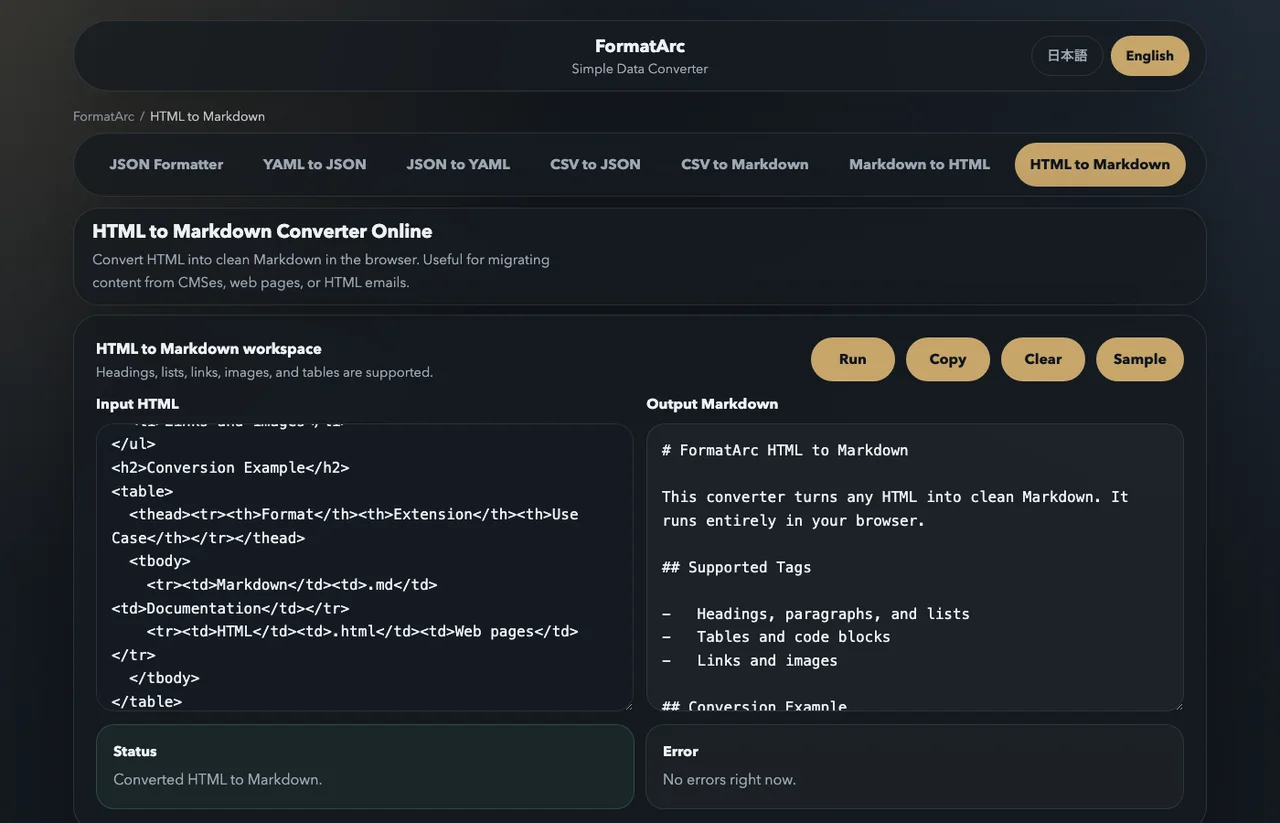
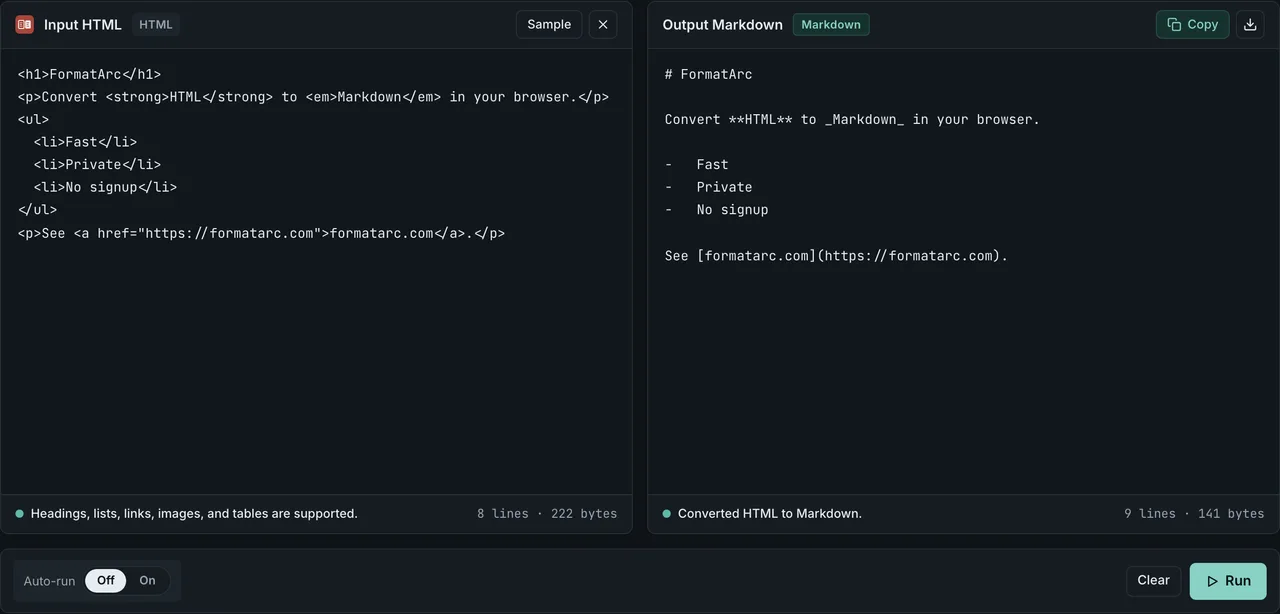
Paste into HTML to Markdown and press Run. The Markdown appears in the right pane.
For a deeper walkthrough of the conversion itself — tables, image paths, colspan edge cases — see the HTML to Markdown guide. For the reverse direction when the LLM responds with Markdown that you want back as HTML, Markdown to HTML handles it locally too.
Step 3: Trim before pasting
Even after conversion, scan the Markdown for residue you do not need:
- Navigation links that converted into list items at the top.
- Cookie-consent banners that still left a paragraph behind.
- Footer copyright blocks.
Two minutes of manual trimming usually buys back more context than any further automated step.
Step 4: Prompt with the cleaned Markdown
A simple template that works for most extraction tasks:
Below is a documentation page in Markdown.

Task: <one sentence>.
Constraints: <output format, length, etc.>.

---

<paste the cleaned Markdown here>
The Markdown headings give the model strong anchors to reference in its reply ("In the 'Syntax' section..."), which improves answer specificity.
Pitfalls when converting HTML for LLM input
Five things tend to go wrong. Watch for these:
- Code blocks losing their language hint.
<pre><code class="language-python">should become```python. Some converters drop the hint, which forces the model to guess the language. - Tables with
colspanorrowspancollapsing. GFM pipe tables are strictly rectangular, so merged cells get flattened. For data tables, consider converting via CSV to Markdown instead — the CSV to Markdown guide walks through the conversion. See also the Markdown table syntax cheatsheet and the GFM table cheatsheet for alignment and escaping. - Inline HTML leaking through. CommonMark and GFM both allow raw HTML inline. If the model is going to see
<span class="text-red">important</span>in your "Markdown", that is back in the wrapper-tax bucket. Use a converter that emits pure Markdown for the cases it can, and keep raw HTML only for the constructs (mathematical notation, complex tables) that genuinely need it. - Relative image and link paths.
<img src="/images/foo.png">becomes, which the LLM cannot fetch. Either rewrite the paths to absolute URLs or note in the prompt that images are unavailable. - CommonMark vs GFM mismatch. Tables, task lists, strikethrough, and autolinks are GFM extensions. If your downstream tooling is strict CommonMark, those features will not render. See CommonMark vs GFM for the boundary.
Format comparison at a glance
For the impatient, here is the decision matrix:
| Format | When to use as LLM input | Token cost | Strength | Weakness |
|---|---|---|---|---|
| Markdown | Default for most prompts: docs, articles, READMEs, chat logs | Low | Structural cues match training data; tables, lists, code preserved | Loses attribute semantics, no inline styling |
| Plain text | Pure text extraction, OCR-like tasks | Lowest | Smallest footprint | Structure is gone; bad for lists or tables |
| HTML | Accessibility audits, schema.org / microdata, visual layout reasoning | Highest | Carries attributes, semantics, embedded media | Wrapper tax; noise distracts the model |
| JSON | Structured records, API responses, function-call payloads | Medium | Unambiguous schema; the model can pattern-match keys | Verbose for prose; quoting overhead |
| XML | Anthropic recommends XML tags for prompt sections in Claude | Medium | Explicit boundaries between prompt parts | Verbose; CommonMark structure is usually sufficient |
For most everyday prompts — "summarize this article", "extract these fields", "rewrite in plain English" — Markdown is the right default.
Frequently asked questions
Should I use Markdown or plain text for ChatGPT context?
Markdown if the source has any structure (headings, lists, tables, code). Plain text if it is genuinely flat prose. Plain text is cheapest but discards the structural cues that help the model navigate longer contexts.
Does Claude understand Markdown better than HTML?
Claude handles both. Anthropic's prompting guidance recommends Markdown-style headings and lists to separate prompt sections, and additionally encourages XML tags (<instructions>, <context>) as boundaries between prompt parts. Markdown still wins on token efficiency for the content itself; XML is helpful around the content as scaffolding.
What about JSON or XML for structured context?
Use JSON when the data is naturally tabular or record-shaped (API responses, configuration). Use XML when you want explicit boundaries between sections of the prompt — Anthropic's docs use this style. For prose, neither beats Markdown on token cost.
How do I convert a URL directly to LLM-ready Markdown?
There is no fully client-side way to fetch an arbitrary URL from a static page (CORS blocks it). Save the page locally first (Cmd/Ctrl-S, or copy the source from DevTools) and paste the HTML into HTML to Markdown. The conversion itself stays in your browser.
Is FormatArc's conversion really browser-only?
Yes for the conversion step. The HTML you paste is parsed by the TurndownOpens in a new tab JavaScript library bundled with the page, and no request is sent containing the source. The page itself loads from a CDN over HTTPS and may make standard analytics calls on first visit, but your pasted HTML is not part of any outbound request.
Wrapping up
For LLM context, Markdown beats HTML on both axes that matter: it costs fewer tokens, and it lets the model focus on content rather than scaffolding. The exact ratio depends on the source page, but the direction is consistent across published benchmarks.
If the source HTML is sensitive — internal docs, customer data, unpublished drafts — the conversion step itself matters. HTML to Markdown runs locally in your browser, so the source never reaches a third-party server.
For the reverse direction, see Markdown to HTML and the Markdown to HTML guide. For specific issues with tables in your converted Markdown, the Markdown table syntax cheatsheet covers escaping, alignment, and pitfalls.