TL;DR — pick a method in 10 seconds
- Need it right now, no install → FormatArc JSON to YAML (browser-side, no upload, validates JSON, preserves key order)
- CLI / one-liner →
yq -P '.' file.json(the DevOps default,-Pfor block style) - Python script with key order →
yaml.dump(data, sort_keys=False, default_flow_style=False, allow_unicode=True) - Node.js application →
js-yamlyaml.dump(data, { lineWidth: -1 }) - Go service →
gopkg.in/yaml.v3yaml.Marshal - Kubernetes round-trip →
kubectl get ... -o json | jq '...' | yq -P '.' - From JSON array to multi-document YAML →
yq -P '.[]' --split-exp 'true' json.array.json
| Method | Setup | Preserves key order | Block scalars (|) | Multi-doc output | Comments insertion |
|---|---|---|---|---|---|
| FormatArc browser | None | Yes | Yes | No | No (you add later) |
yq -P '.' | brew install yq | Yes | Yes | Yes (split-exp) | No |
Python yaml.dump (PyYAML) | pip install pyyaml | Needs sort_keys=False | Yes | Manual --- separator | No |
Python ruamel.yaml | pip install ruamel.yaml | Yes | Yes | Yes | Yes (manual API) |
Node js-yaml | npm install js-yaml | Yes | Yes | Manual | No |
Go yaml.Marshal | go get gopkg.in/yaml.v3 | Yes (for yaml.Node) | Yes | Encoder loop | No |
Converting JSON to YAML is structurally trivial — both formats represent the same data model. The hard parts are preserving key order, deciding when to quote strings, handling multi-line strings, splitting JSON arrays into multi-document YAML, and avoiding the Norway problem in the output.
Why convert JSON to YAML?
JSON and YAML can represent the same data structures — maps, lists, strings, numbers, booleans, and null. They are functionally interchangeable. The reason to prefer one over the other usually comes down to context and readability.
Kubernetes and container orchestration
Kubernetes accepts both JSON and YAML for resource definitions, but the ecosystem overwhelmingly uses YAML. Documentation, tutorials, blog posts, and Stack Overflow answers are almost exclusively YAML. If you generate a resource definition programmatically (which often produces JSON), converting it to YAML makes it consistent with everything else in your cluster configuration and easier to review in pull requests.
kubectl even has a built-in mode for this:
kubectl get deployment web-app -o yaml > deployment.yaml
But when the source of truth is JSON (an admission controller webhook response, a Terraform Kubernetes provider output, a custom operator's reconciliation result), explicit conversion is required.
Docker Compose and Helm values
Docker Compose files are YAML by definition. If you have service configuration stored as JSON (perhaps from a configuration management API or a service mesh control plane), you need YAML before it can be used as a Compose file.
Helm chart values files are YAML. When you fetch values from an external source like Vault or AWS Parameter Store (which return JSON), convert to YAML before passing to helm install -f values.yaml.
Ansible playbooks
Ansible playbooks and inventories are YAML. Output from cloud APIs, CMDB systems, or asset databases typically arrives as JSON. Conversion to YAML is the first step before using it in playbooks.
Readability and editing
YAML is more human-friendly for configuration files. It eliminates the visual noise of curly braces, square brackets, and commas. Compare:
JSON:
{
  "server": {
    "host": "0.0.0.0",
    "port": 8080,
    "workers": 4,
    "logging": {
      "level": "info",
      "format": "json"
    }
  }
}
YAML:
server:
  host: 0.0.0.0
  port: 8080
  workers: 4
  logging:
    level: info
    format: json
The YAML version has fewer characters, less punctuation, and the hierarchical structure is communicated through indentation. For files that humans read and edit regularly, this matters.
Adding comments
JSON does not support comments. YAML does. If you need to annotate a configuration file — explaining why a value is set a certain way, documenting allowed values, or leaving notes for your team — YAML lets you do that directly:
server:
  host: 0.0.0.0
  port: 8080
  # Increase workers for production; 4 is fine for staging
  workers: 4
Converting JSON to YAML is often the first step before adding these kinds of annotations. The comments themselves cannot come from JSON — JSON has no comment syntax. See How to add comments to JSON for workarounds if you must keep the source as JSON.
When you need JSON → YAML: 4 concrete scenarios
Scenario 1: Kubernetes API → manifest in Git
The Kubernetes API returns JSON. You want to commit the deployment to your GitOps repo as YAML:
kubectl get deployment web-app -o json | yq -P '.' > deployment.yaml
git add deployment.yaml && git commit -m "Capture web-app current state"
Scenario 2: Helm values from Vault
Vault returns secrets as JSON. Helm expects YAML values files:
vault read -format=json secret/prod/app | jq '.data.data' | yq -P '.' > values.yaml
helm upgrade --install app ./chart -f values.yaml
Scenario 3: Docker Compose from a control plane API
A service mesh control plane returns service definitions as JSON. Docker Compose needs YAML:
curl -s https://control-plane/services | jq '.' | yq -P '.' > docker-compose.yml
docker compose up -d
Scenario 4: Ansible inventory from a CMDB
Most CMDBs (Device42, ServiceNow, NetBox) return JSON over REST. Ansible inventories are YAML:
curl -s https://cmdb/hosts | jq '.hosts' | yq -P '.' > inventory.yaml
ansible-playbook -i inventory.yaml site.yaml
In all four scenarios, the conversion is one pipeline step and easily scriptable.
Browser-side vs cloud converters: why uploading config files is risky
Many online JSON-to-YAML converters claim "client-side processing" but actually POST your data to their server. For configuration files this is dangerous because configs often contain:
- API tokens and credentials in
secret:blocks - Database connection strings with passwords
- Cloud provider access keys (IAM roles, service account JSON)
- Internal hostnames and infrastructure layout
- Encryption keys and TLS certificates
Even if the service claims not to log uploads, a single misconfiguration on their side leaks your secrets. The safe approach is browser-side conversion that genuinely never sends data to a server.
This is not hypothetical. In November 2025, security firm watchTowr reported that JSONFormatter and CodeBeautify — two of the most popular online formatting and conversion sites — had years of saved user submissions publicly browsable through their "Recent Links" feature. Researchers collected over 80,000 entries (5GB+), including Active Directory credentials, database and cloud access keys, private keys, CI/CD secrets, JWT and API tokens, payment gateway credentials, and full AWS Secrets Manager exports, affecting organizations across government, banking, healthcare, and aerospace (watchTowr's disclosureOpens in a new tab). Anything you paste into a converter that stores or transmits your input can be exposed the same way.
To verify: open the converter, open DevTools → Network, disable network, paste your JSON. If the tool keeps working, it is browser-side. If it hangs or errors, it is cloud-based.
The FormatArc JSON to YAML tool keeps working with network disabled. So does yq locally. So does any Python / Node / Go script on your laptop.
For Kubernetes Secrets, Helm values containing API tokens, or any config with credentials, always use a local converter.
For a full method to verify whether an online converter is safe before pasting, see Are online JSON converters safe?.
Method 1: FormatArc browser tool (no upload)
The JSON to YAML tool converts your JSON to properly formatted YAML in seconds, entirely in your browser.
- Open the JSON to YAML converter.
- Paste your JSON into the left panel.
- Click Convert.
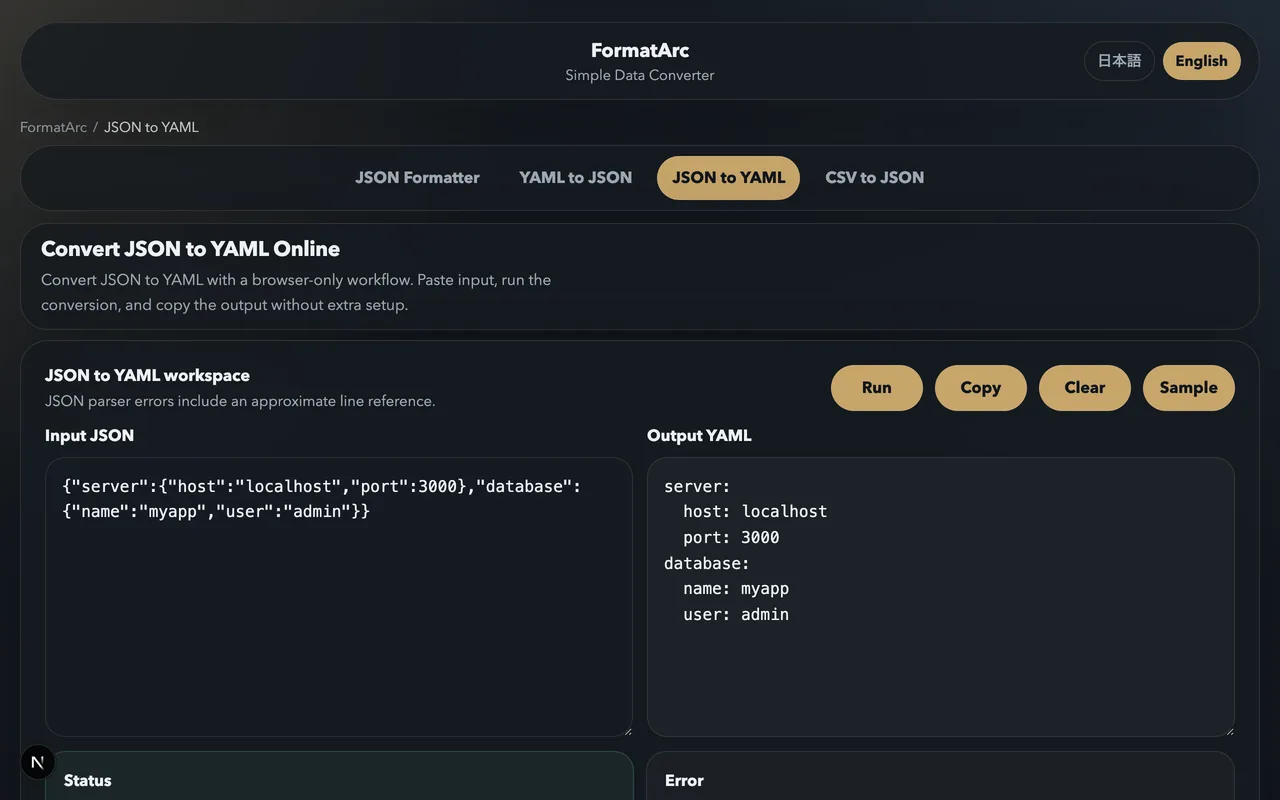
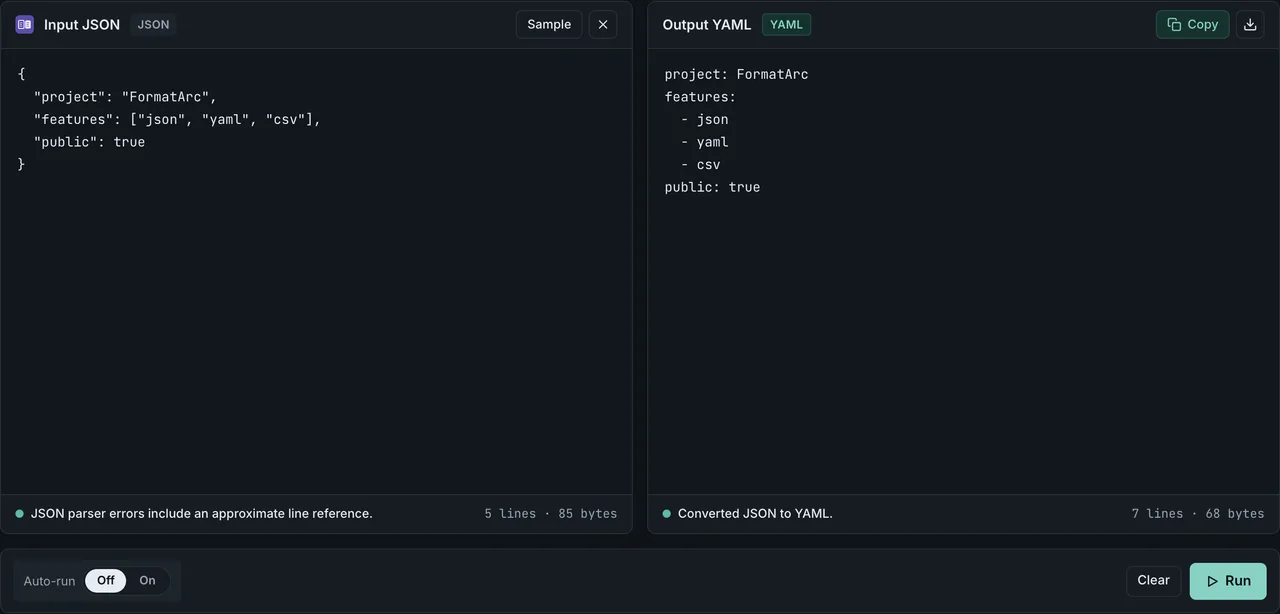
The tool validates your JSON before converting, so if there is a syntax error — a missing comma, a trailing brace, unquoted keys — it reports the problem with a line number. This makes it useful as a JSON validator even when you do not need YAML output. See JSON parse error troubleshooting for common JSON syntax problems.
Since the conversion runs in your browser, you can safely paste credentials, internal configurations, or any other sensitive data without it being transmitted anywhere.
The output uses 2-space indentation (the Kubernetes standard), preserves key order from the input JSON, and uses block style by default (so it looks like normal YAML, not flow style with braces).
Method 2: yq (the DevOps default)
yq handles JSON-to-YAML conversion just as cleanly as the reverse direction:
# Basic conversion
yq -P '.' input.json > output.yaml

# Pipe from stdin
cat config.json | yq -P '.' > output.yaml

# Pretty (block style); without -P, output may use flow style
yq -P '.' input.json

# Set indent (default 2)
yq -P -I=4 '.' input.json

# Extract sub-tree and convert
yq -P '.spec.template' deployment.json

# Multi-document output from JSON array
yq -P '.[]' --split-exp 'true' kubernetes-list.json
The -P flag is short for --prettyPrint which forces YAML block style. Without it, yq may output flow style (which looks like JSON with fewer quotes) for nested structures.
Install:
# macOS
brew install yq

# Linux (binary)
sudo wget -qO /usr/local/bin/yq https://github.com/mikefarah/yq/releases/latest/download/yq_linux_amd64
sudo chmod +x /usr/local/bin/yq

# Docker
docker run --rm -i mikefarah/yq -P '.' < input.json > output.yaml
yq with jq for filtering during conversion
# Extract just spec.template from a deployment and convert to YAML
jq '.spec.template' deployment.json | yq -P '.'

# Or do it all in yq
yq -P '.spec.template' deployment.json
Method 3: Python (yaml.dump and ruamel.yaml)
PyYAML basic usage
import json
import yaml

with open("config.json") as f:
    data = json.load(f)

with open("config.yaml", "w") as f:
    yaml.dump(
        data,
        f,
        default_flow_style=False,   # block style (the usual YAML look)
        allow_unicode=True,          # do not escape Unicode characters
        sort_keys=False,             # preserve original key order
    )
The three options that matter:
default_flow_style=False— produces normal YAML, not the compact{a: 1, b: 2}formallow_unicode=True— keeps Japanese, accented Latin, emoji as-is rather than\uXXXXescapessort_keys=False— preserves the JSON input order (essential for Kubernetes whereapiVersionmust come beforekind)
One-liner
python3 -c 'import sys, json, yaml; yaml.dump(json.load(sys.stdin), sys.stdout, default_flow_style=False, allow_unicode=True, sort_keys=False)' < input.json > output.yaml
ruamel.yaml for round-trip with comments
If you need to add comments to the generated YAML or preserve specific formatting:
from ruamel.yaml import YAML
import json

yaml_writer = YAML()
yaml_writer.default_flow_style = False
yaml_writer.preserve_quotes = True
yaml_writer.indent(mapping=2, sequence=4, offset=2)

with open("config.json") as fin:
    data = json.load(fin)

# Add comments programmatically
data.yaml_set_comment_before_after_key("server", before="Web server configuration")

with open("config.yaml", "w") as fout:
    yaml_writer.dump(data, fout)
ruamel.yaml is the right choice when comments matter — JSON has no comments, so any annotation must be added during or after conversion.
Method 4: Node.js (js-yaml)
const fs = require("fs");
const yaml = require("js-yaml");

const data = JSON.parse(fs.readFileSync("config.json", "utf8"));
const ymlText = yaml.dump(data, {
  lineWidth: -1,    // never wrap long lines
  noRefs: true,     // do not emit YAML anchors / aliases
  sortKeys: false,  // preserve input order
  quotingType: '"', // prefer double quotes when quoting is needed
});

fs.writeFileSync("config.yaml", ymlText);
lineWidth: -1 prevents js-yaml from wrapping long lines, which can cause unexpected line breaks in URLs and other long values. noRefs: true disables anchor generation — useful when the consumer is kubectl or another tool that does not support YAML anchors.
Method 5: Go (gopkg.in/yaml.v3)
package main

import (
    "encoding/json"
    "fmt"
    "os"

    "gopkg.in/yaml.v3"
)

func main() {
    data, _ := os.ReadFile("config.json")
    var obj interface{}
    json.Unmarshal(data, &obj)
    out, _ := yaml.Marshal(obj)
    fmt.Print(string(out))
}
For key order preservation in Go, use yaml.Node directly instead of interface{} — json.Unmarshal into map[string]interface{} does not preserve order (Go maps are intentionally randomized). For Kubernetes manifests where order matters, this is a problem:
// Use yaml.Node for explicit ordering
var node yaml.Node
yaml.Unmarshal(data, &node)
out, _ := yaml.Marshal(&node)
Alternatively, since Go's encoding/json sorts map keys alphabetically, use a third-party library like github.com/iancoleman/orderedmap to preserve insertion order.
Kubernetes Deployment example: JSON to YAML round trip
A complete real-world example. Start with a JSON deployment definition:
{
  "apiVersion": "apps/v1",
  "kind": "Deployment",
  "metadata": {
    "name": "web-app",
    "labels": { "app": "web", "tier": "frontend" }
  },
  "spec": {
    "replicas": 3,
    "selector": { "matchLabels": { "app": "web" } },
    "template": {
      "metadata": { "labels": { "app": "web" } },
      "spec": {
        "containers": [{
          "name": "nginx",
          "image": "nginx:1.25",
          "ports": [{ "containerPort": 80 }],
          "env": [
            { "name": "LOG_LEVEL", "value": "info" }
          ]
        }]
      }
    }
  }
}
Convert with yq:
yq -P '.' deployment.json
Output:
apiVersion: apps/v1
kind: Deployment
metadata:
  name: web-app
  labels:
    app: web
    tier: frontend
spec:
  replicas: 3
  selector:
    matchLabels:
      app: web
  template:
    metadata:
      labels:
        app: web
    spec:
      containers:
        - name: nginx
          image: nginx:1.25
          ports:
            - containerPort: 80
          env:
            - name: LOG_LEVEL
              value: info
Note that apiVersion stays before kind, before metadata — key order is preserved. With PyYAML and sort_keys=True (the default), the output would be alphabetical and kubectl apply would still work, but the diff against the upstream Kubernetes example becomes harder to review.
Apply: kubectl apply -f deployment.yaml.
String quoting in YAML: when "8080" becomes 8080
YAML has complex rules about when strings need quotes. JSON-to-YAML converters apply these rules to the output, which can cause unexpected type changes.
Numbers-as-strings get unquoted
If your JSON has "8080" as a string (because the API returned it that way), converters may unquote it in YAML, turning it into a number:
JSON:
{ "port": "8080" }
After conversion (some tools):
port: "8080" # good: preserved as string
Or:
port: 8080 # bad: became a number
yq v4 preserves the original type (string stays string). PyYAML with default settings also preserves it. js-yaml preserves it. The risk is highest with hand-written conversion code that uses heuristics.
To force quoting in PyYAML, wrap values:
class QuotedString(str): pass

def represent_quoted(dumper, data):
    return dumper.represent_scalar("tag:yaml.org,2002:str", str(data), style='"')

yaml.add_representer(QuotedString, represent_quoted)
Strings that look like booleans
{ "active": "yes" }
After conversion (with YAML 1.1 schema):
active: yes # interpreted as boolean true on the next round trip
A good converter quotes these:
active: "yes"
If you control the source JSON, prefer true / false / null (JSON's native types) over strings like "yes" / "no" — this sidesteps the Norway problem entirely.
Strings starting with special characters
YAML special characters (*, &, !, {, [, >, |, #, @, \``, leading -`) need quoting when they start a value:
{ "tag": "*production*" }
Becomes:
tag: "*production*" # quoted because of leading *
All major converters handle this correctly. The risk only emerges with hand-rolled converters.
Block scalars: | vs > for multiline strings
JSON represents multi-line strings with \n escape sequences. When converted to YAML, a good converter uses block scalar notation:
JSON:
{
  "description": "Line one\nLine two\nLine three"
}
A converter has three reasonable choices in YAML:
Literal block (|) — preserves newlines exactly
description: |
  Line one
  Line two
  Line three
Each newline in the source becomes a newline in the output string. This is what you want for log messages, certificate PEM blocks, code snippets embedded in config.
Folded block (>) — joins lines with spaces
description: >
  Line one
  Line two
  Line three
This produces the string Line one Line two Line three (newlines become spaces, blank lines become single newlines). Good for long prose that should display as a paragraph.
Quoted single-line
description: "Line one\nLine two\nLine three"
The literal \n escape sequence inside a double-quoted string. Works but is hard to read for more than 2-3 lines.
yq -P defaults to | (literal) for any string containing newlines. PyYAML uses | when default_style=None (the default) and the string has a newline. js-yaml uses | for newline strings by default.
To force a specific style in PyYAML:
yaml.dump(data, default_style='|')   # all strings as literal blocks
yaml.dump(data, default_style='"')   # all strings double-quoted
For Kubernetes ConfigMaps containing multi-line scripts or PEM certificates, | is the right choice and is what kubectl create configmap --from-file produces.
Key ordering: preserving apiVersion → kind → metadata
JSON objects and YAML mappings are both technically unordered per spec. In practice, everyone expects keys in a meaningful order — especially Kubernetes resources where convention has apiVersion first, then kind, then metadata, then spec.
Most converters preserve source order:
yq(Go yaml.v3): preserves order via internalyaml.Node- PyYAML with
sort_keys=False: preserves order (default issort_keys=Truewhich alphabetizes — set it explicitly) js-yamlwithsortKeys: false: preserves orderruamel.yaml: preserves order by default
Watch out for:
- PyYAML's default
sort_keys=True— alphabetizes everything, puttingapiVersionafterkindand breaking the convention - Go's
interface{}unmarshalling — randomizes order (useyaml.Nodeinstead) - Hand-rolled converters that build a
map[string]stringand emit it — Go maps are intentionally random
If you commit YAML to Git, key randomization causes massive diff churn even when the data is unchanged. Always verify your converter preserves order before adopting it for GitOps workflows.
From JSON array to multi-document YAML
A common pattern: you have a JSON array of Kubernetes resources, and you want a single YAML file with multiple ----separated documents (one per resource).
With yq
yq -P '.[]' --split-exp 'true' kubernetes-list.json
This outputs:
---
apiVersion: v1
kind: ConfigMap
metadata:
  name: app-config
---
apiVersion: v1
kind: Service
metadata:
  name: app-service
Save to a file: yq -P '.[]' --split-exp 'true' kubernetes-list.json > resources.yaml. The file is now kubectl apply -f resources.yaml-ready.
With Python
import json
import yaml

with open("list.json") as f:
    items = json.load(f)["items"]   # adjust path to your array

with open("resources.yaml", "w") as f:
    yaml.dump_all(
        items,
        f,
        default_flow_style=False,
        allow_unicode=True,
        sort_keys=False,
    )
yaml.dump_all emits multiple documents separated by ---.
With Node.js
const yaml = require("js-yaml");
const fs = require("fs");

const items = JSON.parse(fs.readFileSync("list.json", "utf8")).items;
const ymlText = items.map(item => yaml.dump(item, { lineWidth: -1 })).join("---\n");

fs.writeFileSync("resources.yaml", ymlText);
Manual joining with ---\n since js-yaml does not have a built-in dumpAll.
CI/CD pipeline integration
GitHub Actions
name: Convert JSON config to YAML for deployment
on:
  push:
    paths: ["config/*.json"]

jobs:
  convert:
    runs-on: ubuntu-latest
    steps:
      - uses: actions/checkout@v4
      - name: Install yq
        run: |
          sudo wget -qO /usr/local/bin/yq https://github.com/mikefarah/yq/releases/latest/download/yq_linux_amd64
          sudo chmod +x /usr/local/bin/yq
      - name: Convert all configs
        run: |
          for f in config/*.json; do
            yq -P '.' "$f" > "${f%.json}.yaml"
          done
      - name: Validate against Kubernetes
        run: |
          for f in config/*.yaml; do
            kubectl apply --dry-run=client -f "$f"
          done
      - uses: stefanzweifel/git-auto-commit-action@v5
        with:
          commit_message: "Auto-convert configs to YAML"
GitLab CI
generate-yaml:
  image: mikefarah/yq:latest
  stage: build
  script:
    - for f in config/*.json; do yq -P "." "$f" > "${f%.json}.yaml"; done
  artifacts:
    paths:
      - config/*.yaml
Jenkins (declarative)
pipeline {
  agent any
  stages {
    stage('Convert configs') {
      steps {
        sh 'for f in config/*.json; do yq -P "." "$f" > "${f%.json}.yaml"; done'
      }
    }
    stage('Validate') {
      steps {
        sh 'for f in config/*.yaml; do kubectl apply --dry-run=client -f "$f"; done'
      }
    }
  }
}
Converting and validating are one command each. How much they add to a CI run depends on the manifest size and the runner.
A practical workflow for Kubernetes
Here is the most common real-world scenario. You use kubectl to get a resource as JSON, modify it, save it as YAML, and commit to Git:
# Get the current deployment as JSON
kubectl get deployment web-app -o json > deployment.json

# Edit (or use jq for automated changes)
jq '.spec.replicas = 5' deployment.json > updated.json

# Convert to YAML for your Git repository
yq -P '.' updated.json > deployment.yaml

# Inspect, commit, push
git diff deployment.yaml
git add deployment.yaml && git commit -m "Scale web-app to 5 replicas"
Or in a single pipeline:
kubectl get deployment web-app -o json | jq '.spec.replicas = 5' | yq -P '.' > deployment.yaml
For quick modifications where you do not need scripting, paste the JSON into the JSON to YAML tool, copy the YAML output, and save it to your file.
Frequently asked questions
Why does port 8080 become a string in my YAML output?
It does not — YAML treats unquoted numbers as numbers. What sometimes happens is the opposite: a JSON string "8080" gets emitted as an unquoted YAML 8080, becoming a number on the next round trip. To preserve string type, ensure your converter quotes ambiguous values. yq v4 and modern PyYAML both handle this correctly.
Can I preserve YAML comments through a round trip?
No. JSON has no comments. If you convert JSON to YAML and add comments, those comments are lost the moment you convert back to JSON. Keep YAML as the source of truth if comments matter, and use JSON comments workarounds on the JSON side.
Why does PyYAML sort my keys alphabetically?
PyYAML's yaml.dump defaults to sort_keys=True. Set sort_keys=False to preserve the input order. This matters for Kubernetes resources where convention puts apiVersion first.
Can I convert Helm values.json to values.yaml?
Yes. The values structure is identical, just the format differs. Use yq -P '.' values.json > values.yaml. Verify the result with helm template ./chart -f values.yaml > rendered.yaml to confirm the manifests match.
Why is my YAML null shown as ~?
YAML has multiple representations for null: null, Null, NULL, ~, or simply an empty value. Different converters choose different representations. yq uses null, PyYAML defaults to nothing (empty), js-yaml uses null. All are equivalent — only cosmetic. To force a specific representation:
yaml.add_representer(type(None), lambda d, _: d.represent_scalar("tag:yaml.org,2002:null", "null"))
Are JSON anchors preserved in the YAML output?
JSON has no anchors. If you want to use YAML anchors (&anchor / *alias) in the output, you must add them manually after conversion or use a YAML-aware editor. ruamel.yaml supports programmatic anchor creation if you need to automate this.
How do I convert JSON to YAML without internet access?
Three local options: install yq (Go binary, single file, no dependencies), use a Python script with pyyaml, or use a Node.js script with js-yaml. The FormatArc JSON to YAML tool also works offline once the page is loaded — browser-side conversion means no further network access is needed.
Going the other direction
To convert YAML back to JSON — for API submission, debugging, or feeding to JSON-only tools — see How to convert YAML to JSON. The FormatArc YAML to JSON tool handles the reverse direction with the same ease.
Related guides
- What is YAML — YAML's data model, history, and common use cases
- What is JSON — JSON's data model and types
- YAML vs JSON — when to use each, with examples
- YAML syntax guide — writing valid YAML from scratch
- YAML to JSON conversion — the reverse direction with 8 conversion gotchas
- How to add comments to JSON — JSONC, JSON5, and workarounds
Summary
Converting JSON to YAML comes up constantly in DevOps, infrastructure-as-code, and configuration management workflows. Five methods cover every situation:
- No-install, sensitive data: FormatArc JSON to YAML — browser-side, preserves key order, line-numbered JSON errors.
- CLI / pipelines:
yq -P '.'— the DevOps default, supports filtering and multi-document output. - Python applications:
yaml.dump(data, sort_keys=False, default_flow_style=False, allow_unicode=True). - Node.js applications:
js-yamlyaml.dumpwithlineWidth: -1andsortKeys: false. - Go services:
gopkg.in/yaml.v3Marshal, usingyaml.Nodefor order preservation.
The four production-critical concerns: preserve key order (essential for Kubernetes), handle multi-line strings with block scalars (|), split JSON arrays into multi-document YAML when consumer expects it, and watch for unquoted strings that look like booleans or numbers triggering the Norway problem on the next round trip.