You converted a PDF to Markdown and the tables came out wrong. That is usually not a problem with how you ran the conversion. It is that the PDF itself does not carry its visible tables as tables. This article explains the mechanism, shows what actually happened across 7 documents we measured, and covers what to do when a table comes out broken.
Most PDFs do not store a visible table as a table
A PDF describes how to paint a page, not how the document is organised. Page content lives in a content stream, and what that stream holds is a sequence of drawing operators and their operands — put this glyph at this position, stroke a line here (see the Graphics and Text chapters of the Adobe PDF Reference 1.7Opens in a new tab). The rules of a table are line-drawing instructions. The cell contents are glyphs placed near those lines. Nothing standard connects the two.
You can see the same gap in what PDF libraries hand back. A TextItem from pdf.js getTextContent() carries str, transform, width, height, hasEOL and similar fields — no row index, no column index, no cell identity (PDF.js API documentationOpens in a new tab). A converter therefore has to infer the grid from glyph positions and line positions.
There is an exception. A PDF tagged for accessibility can carry real structure elements: a Table element, TR row elements, and TH or TD cells, with RowSpan and ColSpan attributes for merged cells (W3C technique PDF6: Using table elements for table markup in PDF DocumentsOpens in a new tab). But tagging is something the author has to do deliberately. Nothing guarantees the file on your disk has it, and without it the converter is back to guessing.
Across 7 documents, two extraction routes failed in opposite ways
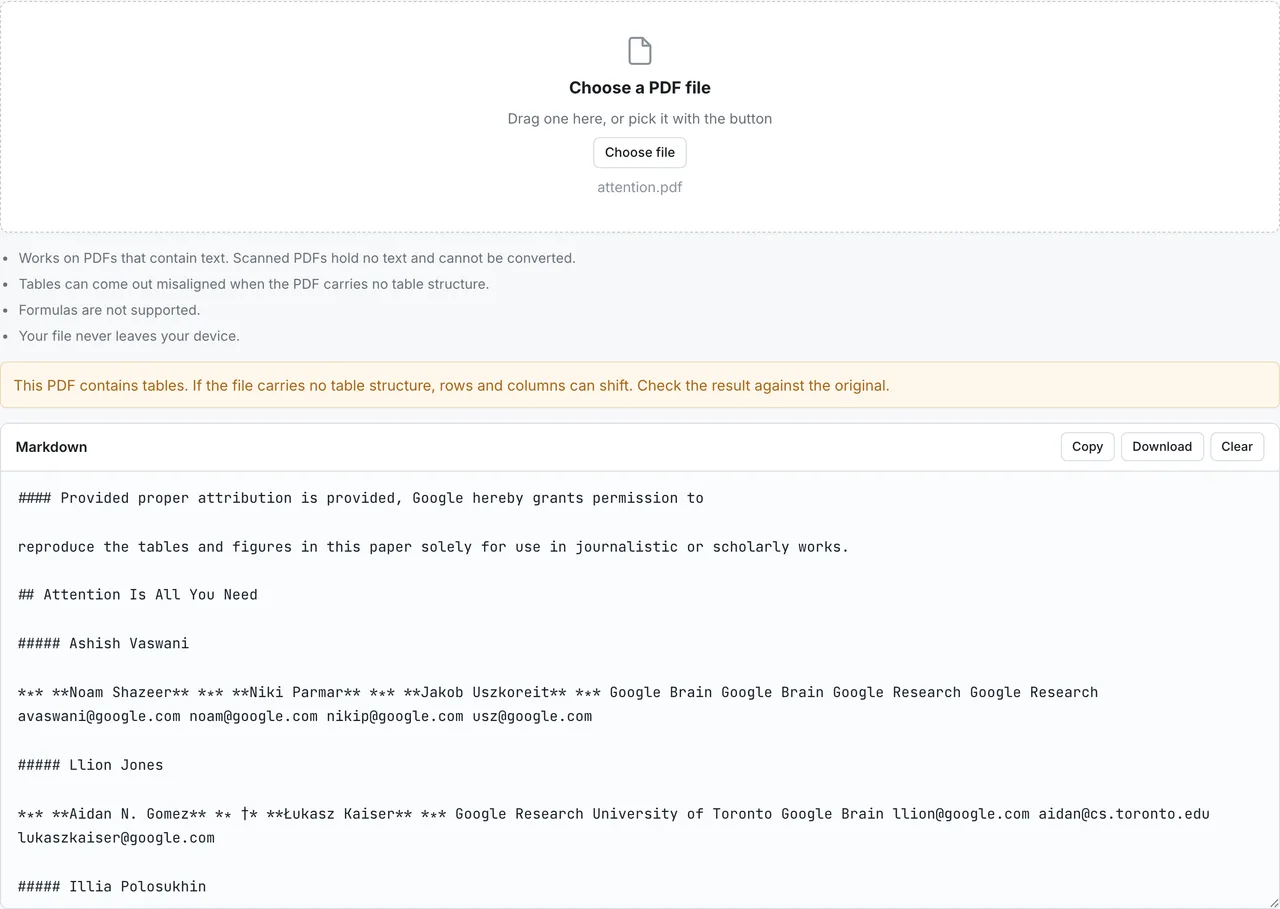
To see what guessing costs, we ran 7 documents with different characteristics — two academic papers, a government technical document, a tax form, a dense statistical report, a slide deck, and a central bank report — through two routes that work differently.
- Text extraction route: pdf.js (pdfjs-dist 6.2.108) with pdf2md (@opendocsg/pdf2md 0.2.7). It has no table assembly step at all.
- Structure inference route: pdf-inspector (@firecrawl/pdf-inspector-wasm 0.1.3). It infers table structure from rectangles, fonts and coordinates.
Measured on 2026-08-02 on an Apple M5 Pro running macOS (Darwin 25.5.0) and Node v26.3.1. All 7 documents contain a text layer; no scanned PDFs are in the set. The fetch script, the measurement script and the raw output live in this site's repository under scripts/benchmarks/pdf-table-extraction/.
| Kind | Table rows, text route | Table rows, inference route | Headings, text route | Headings, inference route | |
|---|---|---|---|---|---|
| Attention Is All You Need | Two-column academic paper | 0 | 50 | 45 | 38 |
| BERT | Two-column academic paper | 0 | 106 | 27 | 42 |
| NIST Cybersecurity Framework 2.0 | Diagram-heavy technical document | 0 | 45 | 3 | 27 |
| IRS Form 1040 (2025) | Fillable form | 0 | 42 | 24 | 5 |
| Labour Force Survey annual report | Multi-level statistical tables | 0 | 405 | 1360 | 6 |
| Japan ICT White Paper 2025 summary | Diagram-driven slides | 0 | 9 | 38 | 112 |
| Outlook for Economic Activity and Prices (Bank of Japan) | Multi-column central bank report | 0 | 19 | 211 | 1 |
Two things stand out. The text route produced zero table rows on all 7 documents, meaning it never builds a table. The inference route always builds one, and the row count says nothing about whether it is right.
Here is the case that makes the point. The multi-column central bank report broke badly — its title and body text ended up inside table cells — yet table rows accounted for 0.43 of its output. The tax form, which has genuine tables, sits at 0.45. No threshold separates those two. A high table-row count is not evidence that the table was extracted correctly.
Failure 1 — the table is abandoned and you get prose
In the first failure mode the table never appears as a table. The cell text is still picked up, but the row and column boundaries are gone, so figures and labels run together as ordinary sentences. That is what the text extraction route did in our measurements: zero table rows on every document.
This failure has one thing going for it. You can see it immediately. A table that is simply missing from the place a table should be is impossible to overlook, which makes the decision to go back to the original easy.
It has a side effect worth naming, though. Individual table rows sometimes get promoted to headings. On the multi-level statistical report, the text route emitted 1360 headings; a manual count of the real headings puts the figure at around 4. If your table of contents suddenly has hundreds of entries, this is the cause.
Failure 2 — you get a table, but the cells are assigned wrong
The second failure mode produces a valid Markdown table whose values sit in the wrong cells. That is what the structure inference route did. The multi-level statistical report came out as 405 table rows, with several years of figures collapsed into a single cell.
|15~ 64歳 6625 5878 6678 5893 6732 5912 …|15~ 24歳 595|25~ 34歳 1168|
This one is the dangerous one. The pipes and the delimiter row are well formed, so it renders correctly and drops straight into a document. A value shifted one column over is invisible to any reader who does not have the original in front of them. It is broken without looking broken, which makes it a different problem from failure 1.
Diagrams and multi-column body text can be detected as tables
Inference also fires on things that are not tables at all. Two concrete cases came out of the measurements.
In NIST Cybersecurity Framework 2.0, the text placed inside the CSF Core wheel diagram (Fig. 1) was emitted as a table, with leading letters dropped:
| Fig. 1. CSF Core structure |||
| --- | --- | --- |
| DENTIFY | ROTECT | ETECT ESPOND |
The actual labels are IDENTIFY, PROTECT, DETECT and RESPOND. Text set along the curve of the ring was split apart and the first character of each label was treated as a separate element, leaving words that mean nothing.
The second case is a whole document turning into a table. In the multi-column central bank report, the title and the body text both landed inside table cells:
|||||2025 年5月1日|
| --- | --- | --- | --- | --- |
||【基本的見解】|1|経済・物価情勢の展望(2025 年4月) <概要>|日本銀行|
The inference route produced exactly 1 heading for that document. A multi-column page layout was read as a single table with several columns.
Which breakages a different method fixes, and which it does not
Whether it is worth trying a different conversion method depends on which failure you hit.
| Symptom | Likely cause | What to do next |
|---|---|---|
| No tables at all in the output | The route you used never assembles tables | Worth trying a method that infers table structure |
| Tables appear but cells are shifted | Coordinate-based inference guessed wrong | Another method will likely guess wrong too. Check against the original and fix by hand |
| A diagram's labels came out as a table | Text inside a figure was read as cells | Discard that table and read the figure from the PDF |
| The whole body text became one table | A multi-column layout was read as a table | Switch to a route that extracts plain text only |
| No characters at all were extracted | The PDF has no text layer | Conversion cannot help. This needs OCR |
The pattern is that whether a table appears at all does change with the method. Whether the table that appears is correct does not, because without structure in the source PDF every method is still inferring.
The reliable way to find out which failure your own file hits is to run it. PDF to Markdown converts inside your browser, so you can test a document that must not leave your machine.

The fixes for the breakages above, and how to get the most out of the original PDF, are covered in the PDF to Markdown guide.
Fixing a broken table
Which of the two steps below comes first depends on how the table broke.
- Failure 1 (the table turned into prose): as the table in the previous section says, a method that infers table structure is worth trying. For a numeric table, rebuilding it from the original is the safer route
- Failure 2 (a table whose cells are shifted): start by checking it against the original. It is the only way to see the shift. Then rebuild any table where a one-cell shift changes the meaning
- A diagram or a multi-column page came out as a table: there is nothing to repair. Discard that table and read the figure or the text from the PDF
Always check the output against the original
When a PDF contains tables, do not use the converted Markdown before comparing it with the source. Failure 2 gives no visual signal, so this comparison is the only way to catch it.
A workable order:
- Count rows and columns and confirm they match the original.
- Check that the header labels appear in the same order as the source.
- Compare the first and last cell of each row against the original. Drift shows up at the edges first.
- Look individually at anywhere the source had merged cells. Markdown tables cannot express a merge, so those regions have been reshaped in some way.
Rebuild numeric tables instead of patching them
For tables where a one-cell shift changes the meaning — money, totals, measurements — rebuilding is faster and safer than repairing. Copy the table out of the original, paste it into a spreadsheet, export it as CSV, and convert that with CSV to Markdown. The cell relationships survive the trip.
For the syntax itself — where pipes go, what the delimiter row needs, how alignment colons work, how to escape a pipe inside a cell — see GitHub Markdown table syntax. Note that tables are not part of core CommonMark but an extension defined by GitHub Flavored Markdown (GFM tables extensionOpens in a new tab), so it is worth confirming that wherever you paste the result supports them.
Telling in advance which PDFs are likely to survive
This is a checklist for lowering the odds, not a guarantee.
What to look at before converting
- Can you drag-select the text inside the table in a PDF viewer? If not, there is no text layer and there is nothing to convert.
- Does the table have ruling lines? Borderless tables give the inference step fewer cues about where cells end.
- Is the page single-column? Two- and three-column layouts can be read as tables in their own right.
- Does the table span a page break? Tables that continue across pages often come out as separate tables per page.
- Are there merged cells? Markdown tables have no equivalent, so merged regions are always reshaped.
- Are diagrams or icons mixed into the table? Text inside a figure can be pulled in as cells.
What to be suspicious of afterwards
- Row-to-row column counts that differ. That is the boundary inference wobbling between rows.
- An unusual number of empty cells, or rows like
|||||that contain nothing but delimiters. - A heading count that looks far too high, which suggests body lines were promoted to headings.
- Words that are not words — the
DENTIFYcase above is what split glyph runs look like. - Long sentences of running text sitting inside a table cell.
Scanned PDFs hold no text, so there is nothing to convert
A PDF made by scanning paper is a picture of each page. You can read the characters, but the file does not contain them as text. In that situation the tables are not the issue; there is no extractable text at all.
What that needs is transcription (OCR), not conversion. FormatArc's PDF tool has no OCR, so it reports that the file cannot be converted rather than returning output built on guesses. Knowing that a file cannot be converted is safer than receiving content that might be wrong.
To check whether your own file is a scan, try dragging across the text in a viewer. If nothing selects, it is an image.
Frequently asked questions
Will a different converter fix my tables?
It depends on the failure. If no tables appear at all, switching to a method that infers table structure will at least produce tables. If the cells are shifted, every method is still inferring from coordinates unless the source PDF carries structure, so there is no guarantee.
Do tagged PDFs avoid the problem?
When tagging is present and correct, Table, TR, TH and TD can be read directly instead of inferred. But tagging is decided by whoever produced the PDF, not by you, and even a tagged file can carry structure that disagrees with what is visually rendered.
Can I convert a scanned PDF?
Not with FormatArc. Scanned PDFs carry no text and need OCR, which this tool does not provide, so it reports the file as not convertible instead of attempting it.
Is there a way to extract only the tables?
There is no table-only extraction here, but copying the table from the original, routing it through a spreadsheet as CSV and converting that to Markdown preserves the cell relationships. For numeric tables this is the more reliable path.
Summary
PDF tables break in Markdown because most PDFs do not carry a visible table as reusable structure, leaving the converter to infer a grid from glyph and line positions. In our measurements that inference failed in two directions: one route produced no tables at all, the other produced well-formed tables with misassigned cells. The second is the one to watch, because it does not look broken — so whenever a PDF contains tables, compare the converted output against the original.
To see how your own file behaves, run it through PDF to Markdown. The file is processed in your browser and is never uploaded.