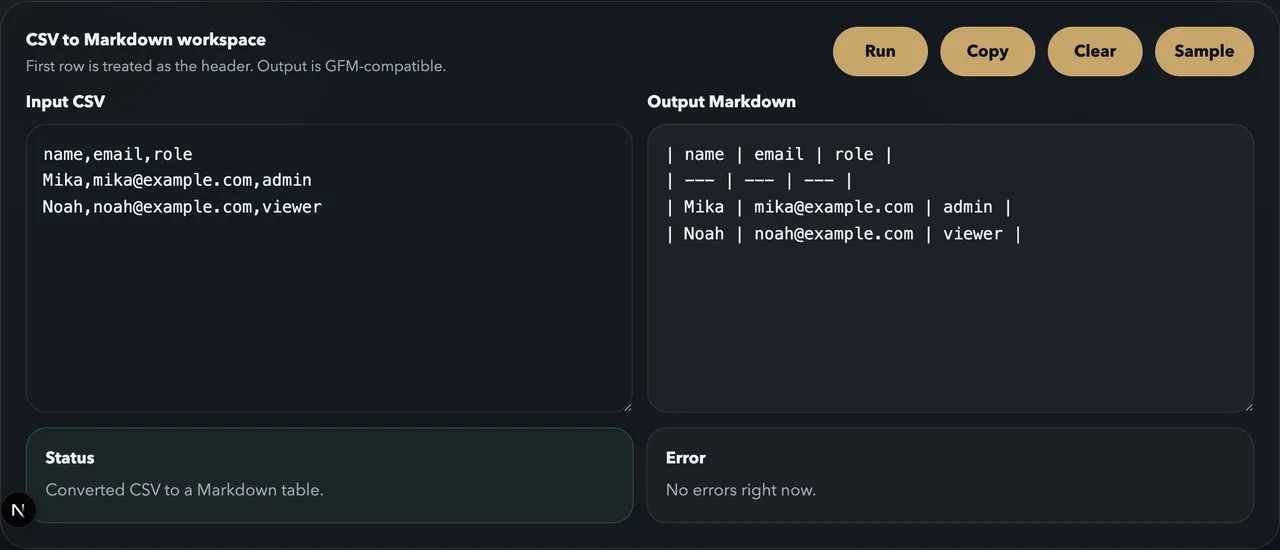
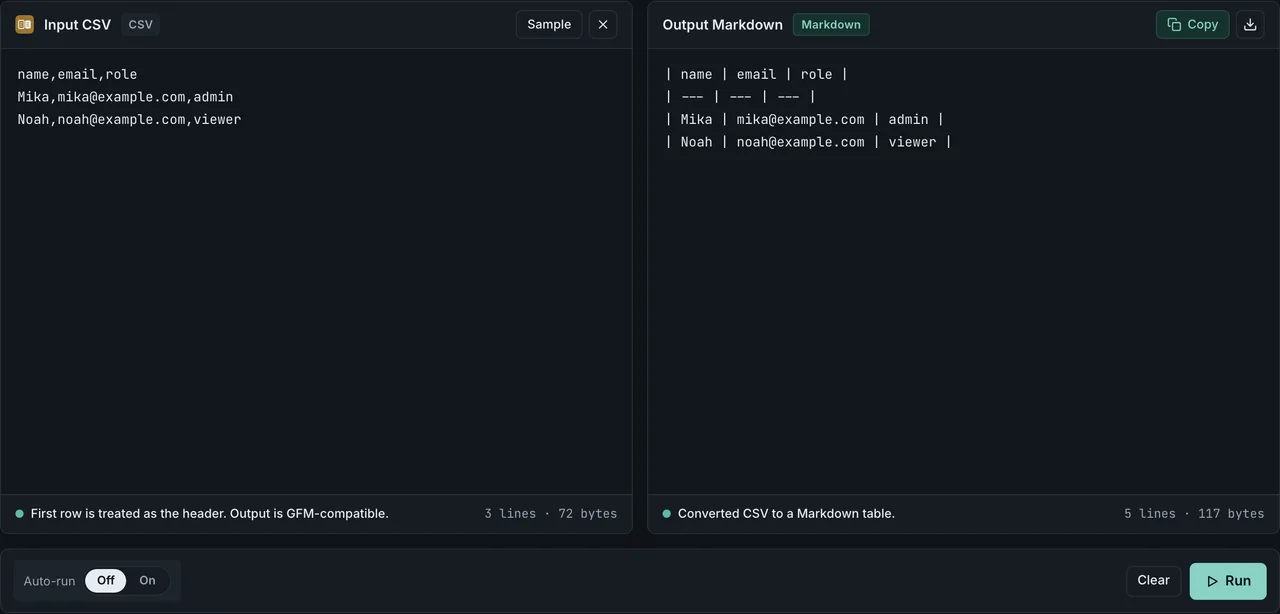
Quick answer
Tables in Markdown use pipe characters | and hyphens -. Nothing else required.
| Name | Email | Role |
| --- | --- | --- |
| Mika | mika@example.com | admin |
| Noah | noah@example.com | viewer |
If typing pipes by hand is not your idea of a good time, paste CSV into CSV to Markdown and get a formatted table instantly. The rest of this article walks through the syntax in detail.
Basic syntax — pipes and hyphens
A Markdown table has three parts:
- Header row — column names separated by pipes
| - Separator row — hyphens
-(conventionally three per column), separating the header from data - Data rows — cell values separated by pipes
| Item | Value |
| --- | --- |
| CPU | Apple M4 |
| RAM | 16 GB |
Leading and trailing pipes are optional but recommended for readability. Column widths do not need to be aligned in the source; the renderer handles that.
Pipe and separator row anatomy
The pipe character | separates columns. The separator row — also called the header separator or dashes row — is built from hyphens - (commonly called dashes) and tells the renderer where the header ends and the data begins.
| Row | What it does | Required? |
|---|---|---|
| Header row | Names each column, written between pipes | Yes |
| Separator row | Hyphens (---) divide header from data and hold the alignment colons | Yes |
| Data rows | Cell values between pipes | One or more |
A few rules worth knowing about pipes and dashes:
- Three dashes per column (
---) is the convention, but not a parser rule. The GFM spec sets no minimum, and--or even a single-renders as a table in GFM renderers (verified with marked 18.0.5 and remark-gfm 4.0.1). Stick with three dashes for readability, not because fewer would fail - What actually breaks a table is a separator row whose column count differs from the header row. The GFM spec is explicit: if the counts don't match, the table is simply not recognized
- Pipes at the row start and end are optional, but recommended for readability.
| A | B |andA | Bboth render the same - Alignment colons (
:---,:---:,---:) only go in the separator row, never in data rows - The header row is mandatory in GFM. CommonMark's core spec has no tables at all, so headerless tables exist only in custom extensions
If a renderer ignores your table, check the column counts first: a separator row that doesn't match the header row's column count prevents table recognition entirely. The other common cause is a missing blank line before the table — the dash count is almost never the problem.
Column alignment — left, center, right
Add colons : to the separator row to control alignment:
| Syntax | Alignment |
|---|---|
:--- | Left (default) |
:---: | Center |
---: | Right |
| Product | Qty | Price |
| :--- | :---: | ---: |
| Apples | 3 | 1.20 |
| Oranges | 10 | 0.80 |
Right-aligning numeric columns keeps digits lined up and makes the table easier to scan.
GFM (GitHub Flavored Markdown) support
GitHub, GitLab, Zenn, Qiita, Notion, Obsidian, and most developer-facing platforms support GFM table syntax. Everything shown above works as-is on these platforms.
A few things worth remembering about GFM tables:
- The header row is mandatory. You cannot create a headerless table in GFM
- The separator row uses hyphens (
---) — three per column by convention, though the spec allows fewer - Inline formatting (
`code`, links, strikethrough) works inside cells - Some parsers require a blank line before and after the table to recognize it
Platform pipe-table support
The three table primitives — pipe | tables, colon alignment in the separator row (:---), and <br> for an in-cell line break — are supported unevenly across platforms. The table below summarizes each platform's behavior, with the per-platform notes underneath:
| Platform | Pipe tables | Colon alignment (:---) | In-cell <br> |
|---|---|---|---|
| GitHub | Yes | Yes | Yes |
| GitLab | Yes | Yes | Yes |
| Obsidian | Yes | Yes | Yes |
| Notion | Yes | No | No |
Notes on the table:
- GitHub follows the GitHub Flavored Markdown spec — Tables (extension)Opens in a new tab, which defines pipe tables and colon alignment in the delimiter row. Cells are parsed as inline content, so inline raw HTML like
<br>is allowed, and GitHub renders it as an in-cell line break. - GitLab Flavored Markdown documents the same pipe-table and alignment syntax, and its docs explicitly note that you can use a
<br>tag to force multiple lines inside a cell. - Obsidian supports pipe tables and colon alignment in its documented table syntax, and in practice it renders a
<br>tag as an in-cell line break. - Notion can import or paste pipe tables, but it converts them into its own table blocks rather than rendering GFM. Notion tables have no per-column alignment, so the alignment colons (
:---) have no visible effect, and an in-cell<br>is not rendered as a line break.
Pipe tables and CommonMark — what the specs actually say
Pipe tables are not part of core Markdown. The CommonMark specOpens in a new tab (0.31.2) defines no table syntax at all; tables come from the GFM Tables extensionOpens in a new tab, which defines the separator row as cells "whose only content are hyphens (-), and optionally, a leading or trailing colon (:)". No minimum dash count appears anywhere in the spec. GitHub's own documentation says each column must have at least three hyphens, but the spec sets no such rule and GitHub's renderer accepts a single one — the spec's own alignment example even uses :-: with one hyphen.
To pin the claims down, here is the same set of edge cases run through GitHub's production renderer (via the Markdown API), marked, remark-gfm, and a strict CommonMark pipeline with no extensions. The reproduction script lives in scripts/benchmarks/markdown-table-parsers/ in the repository. Measured 2026-07-15 with marked 18.0.5, remark-gfm 4.0.1, and remark-parse 11.0.0:
| Separator row variant | GitHub | marked | remark-gfm | Strict CommonMark |
|---|---|---|---|---|
| One dash per column, outer pipes present | Table | Table | Table | Plain text |
| Two dashes per column | Table | Table | Table | Plain text |
One dash with alignment colons (:-, -:) | Table, aligned | Table, aligned | Table, aligned | Plain text |
| Three dashes, outer pipes omitted | Table | Table | Table | Plain text |
| One dash, outer pipes omitted | No table (parsed as a list) | Table | No table (parsed as a list) | No table |
| Separator column count differs from header | No table | No table | No table | No table |
Three findings worth noting:
- The dash count never decides whether a table renders. One dash behaves exactly like three on GitHub, marked, and remark-gfm — three dashes is a readability convention, not a requirement
- The one real parser difference sits in the second-to-last row: omit the outer pipes and use a single dash, and the separator line starts with
-, which GitHub and remark-gfm read as a list marker; marked still sees a table. If you omit outer pipes, keep at least two dashes - What reliably kills a table everywhere is a separator row whose column count does not match the header. The table is simply not recognized and falls back to a paragraph, with no error message
Renderers that follow strict CommonMark with no extensions render none of these as tables. For the full set of CommonMark vs GFM differences, see CommonMark vs GFM; for a quick reference of GFM table syntax — alignment, escaping, line breaks — see the GFM table cheatsheet.
Escaping pipes and special characters
A literal | inside a cell collides with the column separator and breaks the table. Two ways to write one safely:
| Command | Meaning |
| --- | --- |
| cmd1 \| cmd2 | backslash escape |
| cmd1 | cmd2 | HTML entity |
\|(backslash escape) works on GitHub, GitLab, Notion, Obsidian, Zenn, Qiita, and most GFM renderers|(HTML numeric entity) is a reliable fallback when a renderer mishandles the backslash form, and it survives copy-paste between editors better than\|
To show a literal backslash in a cell, write \\. To insert a non-breaking space, use .
Outside tables, the same backslash rule applies when characters like * and # turn into formatting on their own. Markdown escape characters lists every escapable character and which ones actually take effect in each renderer.
Wrapping the pipe in backticks does not protect it either, though some guides describe code spans as inherently safe from table syntax. Cell splitting happens before inline code spans are parsed, so a pipe inside backticks still needs the backslash escape:
| a | b |
| --- | --- |
| `x | y` | z |
Feeding this row into GitHub's Markdown API, marked 18.0.5, and remark-gfm 4.0.1 splits the code-span cell in all three renderers: the output has only two <td> cells, `x and y`, with the backticks left unpaired as literal characters, and the third field z is silently dropped (measured 2026-08-29, reproduction steps in scripts/benchmarks/markdown-table-parsers/). The backslash escape still works inside a code span — the same benchmark's `a \| b` case stays intact across all three renderers, so \| is the fix here too. Markdown table not rendering — fix it by symptom walks through this pattern alongside other cell-splitting causes.
Common pitfalls
If a table renders as literal pipes or stops mid-way, the culprit is almost always one of the patterns below. For a symptom-based debugging walkthrough, see Markdown table not rendering — fix it by symptom.
Newlines inside cells
The Markdown table spec does not support line breaks within a cell. If you need a visible break, write an HTML <br> tag directly, though not all platforms render it.
Empty cells
Leave a space (or nothing) between two pipes. A space is preferred for readability:
| A | B | C |
| --- | --- | --- |
| 1 | | 3 |
Mismatched column counts
If a data row has fewer columns than the header, most parsers pad with empty cells. If it has more, the extras are silently dropped. Keeping column counts consistent avoids surprises.
Large datasets — generate from CSV
Hand-writing a five-row table is fine. Past 20 rows, or with many columns, it becomes tedious and error-prone. Copy data from Excel or a spreadsheet as CSV, paste it into CSV to Markdown, and the tool handles pipe alignment and escaping for you.
For a step-by-step walkthrough, see How to Convert CSV to a Markdown Table. If you need to turn the resulting Markdown table into HTML, see Markdown to HTML conversion guide. To extract a Markdown table from existing HTML — a copied web page, a Notion export, or a CMS dump — see the HTML to Markdown guide; for HTML tables specifically, including cells with pipes and line breaks, see how to convert an HTML table to Markdown.
Frequently asked questions
Can I create a Markdown table without a header?
Not in GFM. The header row and separator row are both required. If you do not need visible headers, you still have to include them — use placeholder text or empty header cells.
Can I put links or images inside a cell?
Yes. Inline Markdown like [text](url) and  works inside cells. Keep in mind that wide cells make the source hard to read, so links are usually the practical limit.
Can I control column widths?
Markdown has no column-width syntax. Renderers size columns based on content. For precise control, fall back to an HTML <table>.
Wrapping up
Markdown table syntax is straightforward: pipes for columns, hyphens for the separator, colons for alignment. Once you know these three pieces, you can build any table.
When the data gets large, skip the manual work. Paste CSV into CSV to Markdown and get a clean, correctly escaped table in seconds.
Related articles
- GFM table cheatsheet — quick reference for alignment, escaping, and line breaks
- GitHub README tables from CSV and JSON — practical README use case
- CommonMark vs GFM — broader spec context including tables
- Markdown table not rendering — fix it by symptom — symptom-based debugging when a table breaks
- HTML table to Markdown — convert a copied or exported HTML table into a pipe table