TL;DR — CommonMark vs GFM
- CommonMark is the standard Markdown spec. It defines only the core syntax — headings, lists, emphasis, links, images, code, and blockquotes — and deliberately leaves out extensions.
- GFM (GitHub Flavored Markdown) is a dialect that the GFM spec describes as a "strict superset" of CommonMark. It adds five extensions on top: tables, strikethrough, task lists, extended autolinks, and disallowed raw HTML.
- The GitHub.com features people associate with GitHub Markdown — alerts like
[!NOTE], emoji shortcodes,@mentions, issue references, Mermaid diagrams, math, footnotes — are not in the GFM spec. They are a GitHub.com layer and generally do not work outside GitHub. - Whether a single soft line break becomes a
<br>is the same in CommonMark and the GFM spec: it does not. Only GitHub.com's issue/PR comment boxes turn one newline into a line break —.mdfiles on GitHub still need two trailing spaces, a backslash, or a literal<br>. - If you are not sure which dialect to write in: plain CommonMark is the most portable, GFM extensions are safe for GitHub-style platforms, and GitHub.com-only features should be treated as breakable elsewhere.
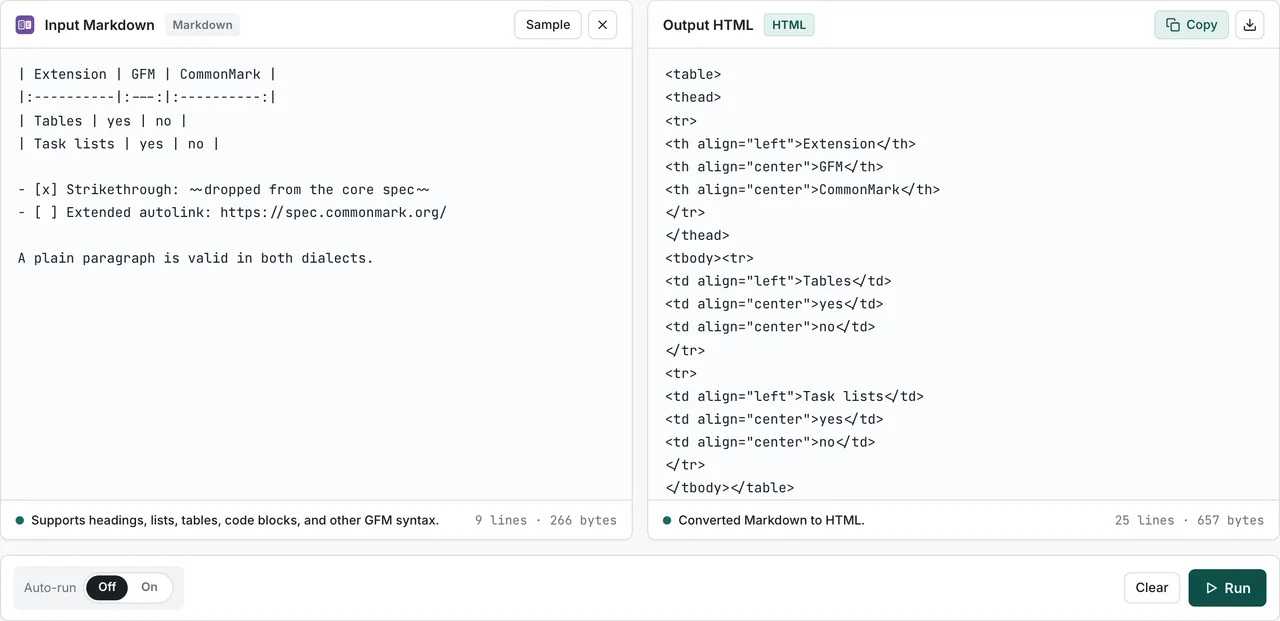
- FormatArc's Markdown to HTML converter supports the GFM extensions (tables, strikethrough, task lists, autolinks). You can also use it to check whether your Markdown depends on GFM-only syntax.
Short answer: Tables are not part of the CommonMark core spec. They are defined in the GFM spec as an extension, alongside strikethrough, task lists, extended autolinks, and disallowed raw HTML rules.
How CommonMark and GFM relate — GFM builds on CommonMark
CommonMarkOpens in a new tab is the project that took the originally ambiguous Markdown grammar and re-specified it precisely, with a test suite. The goal is to remove implementation differences so any conformant parser produces the same output. As a spec it intentionally avoids extensions and only defines core constructs: headings, paragraphs, lists, links, images, emphasis, code, and blockquotes.
GFM (GitHub Flavored Markdown)Opens in a new tab is the Markdown dialect GitHub uses, and the GFM spec itself describes it as a "strict superset" of CommonMark. In spec terms that means:
- Any valid CommonMark document renders identically under a GFM parser.
- GFM only adds a handful of extensions to CommonMark; it does not change the core syntax.
The word "superset" applies to what the GFM spec defines. Once you factor in GitHub.com's actual rendering, individual library implementations, and the latest CommonMark revision, there are edge cases. This article keeps "extensions defined by the GFM spec" and "features GitHub.com adds on its own" separate.
Comparison table — CommonMark vs GFM
| Feature | CommonMark | GFM spec | Added by GitHub.com |
|---|---|---|---|
Headings (#) | ✓ | ✓ | — |
| Paragraphs, lists, blockquotes | ✓ | ✓ | — |
Emphasis (**bold** / _italic_) | ✓ | ✓ | — |
| Links and images | ✓ | ✓ | — |
| Inline code, fenced code blocks | ✓ | ✓ | — |
| Raw HTML in Markdown | ✓ | ✓ (some tags disallowed) | sanitized further |
Tables (| col |) | ✗ | ✓ | ✓ |
Strikethrough (~~text~~) | ✗ | ✓ | ✓ |
Task lists (- [ ] / - [x]) | ✗ | ✓ | ✓ |
| Extended autolinks (bare URLs) | ✗ | ✓ | ✓ |
Alerts (> [!NOTE] etc.) | ✗ | ✗ | ✓ |
Emoji shortcodes (:smile:) | ✗ | ✗ | ✓ |
@mentions / issue & PR refs / commit SHAs | ✗ | ✗ | ✓ |
| Mermaid diagrams / math (KaTeX) | ✗ | ✗ | ✓ |
Footnotes ([^1]) | ✗ | ✗ | ✓ |
The key is the three columns. Tables, strikethrough, and the other GFM extensions work in any GFM-aware parser, not just on GitHub. Alerts, emoji, and footnotes are not in the GFM spec, so they are only guaranteed on GitHub.com (or platforms that copy it).
Which GFM extensions are on by default? 6 renderers, tested
The spec table above tells you what each spec defines. It does not tell you what your parser actually does out of the box — so we measured it. We ran the same Markdown snippets (a pipe table, ~~x~~, ~x~, - [ ] todo, a bare URL, and a [^1] footnote) through five JavaScript parsers and GitHub's own Markdown API. Measured 2026-07-31; the script and the results are committed under scripts/benchmarks/commonmark-vs-gfm/:
| Renderer (version) | Table | ~~x~~ | ~x~ single tilde | Task list - [ ] | Bare URL | Footnote [^1] |
|---|---|---|---|---|---|---|
| commonmark.js 0.31.2 (reference parser) | literal pipes | text | text | [ ] as text | text | mangled into a link |
| marked 18.0.5 (defaults) | <table> | <del> | <del> | checkbox | linked | mangled into a link |
| markdown-it 14.2.0 (default preset) | <table> | <s> | text | [ ] as text | text | mangled into a link |
| remark 15.0.1 (no plugins) | literal pipes | text | text | [ ] as text | text | mangled into a link |
| remark 15.0.1 + remark-gfm 4.0.1 | <table> | <del> | <del> | checkbox | linked | rendered |
GitHub Markdown API (markdown mode) | <table> | <del> | <del> | [ ] as text | linked | rendered |
What the measurements show:
- The same
~~x~~becomes<del>in marked, remark-gfm, and GitHub, but<s>in markdown-it. Even among "GFM-compatible" parsers, the element name itself differs. - The GFM spec's strikethrough rule allows one or two tildes. marked, remark-gfm, and GitHub all strike
~x~; markdown-it requires the double tilde and leaves~x~as plain text. - GitHub's own Markdown API leaves
- [ ]as literal bracket text in its defaultmarkdownmode. Only thegfm(comment-context) mode emits<input type="checkbox">— the task-list checkbox you see in a README is added by a rendering layer, not by every GitHub endpoint. - markdown-it's default preset enables tables and strikethrough but not bare-URL autolinks (
linkifyis off by default), so "supports GFM by default" is only partially true for it. - Parsers without footnote support do not simply ignore
[^1]: note— they parse it as a link reference definition, sotext[^1]silently becomes<a href="note">^1</a>. Meanwhile remark-gfm and GitHub render real footnotes even though footnotes are not in the GFM spec.
To see what your own Markdown turns into under a GFM-aware parser, paste it into Markdown to HTML — it runs marked with gfm: true, entirely in your browser.
Tables in CommonMark — the core spec does not define them
The CommonMark spec deliberately excludes tables from the core syntax. Pipe-and-hyphen tables (| col | col |) are defined only in the GFM spec, where the section is literally titled "Tables (extension)Opens in a new tab" — GFM itself marks tables as an extension, not a core construct. The same "(extension)" label applies to strikethrough, task lists, extended autolinks, and the disallowed raw HTML rules.
So a CommonMark-only renderer (no extensions enabled) shows | col | as a paragraph with literal pipes; a GFM-aware renderer parses the same input into a <table>. This is also why long-running discussions on the CommonMark forumOpens in a new tab and issues like commonmark-spec#393Opens in a new tab keep treating tables as outside the core spec's scope.
To check whether a specific renderer handles tables as a GFM extension, paste a two-row table into Markdown to HTML and look for <table> in the output.
Is plain text a valid CommonMark document?
A related question that comes up when validating Markdown programmatically: does a plain-text paragraph count as valid Markdown? The CommonMark spec answers this directly in section 2.1, "Characters and lines":
Any sequence of characters is a valid CommonMark document.
There is no such thing as an invalid CommonMark document — parsing never fails, it only decides which constructs the text contains. A run of ordinary lines is covered by section 4.8, "Paragraphs":
A sequence of non-blank lines that cannot be interpreted as other kinds of blocks forms a paragraph.
So a file containing nothing but plain sentences is a valid CommonMark document made of paragraphs (section 2.1Opens in a new tab and section 4.8Opens in a new tab of the 0.31.2 spec). And because the GFM spec is a strict superset of CommonMark, the same text is also a valid GFM document — extensions add constructs, they never invalidate existing text. This is also why "Markdown validators" check style conventions or rendering expectations rather than validity: there is no such thing as a Markdown syntax error at the spec level.
There is one boundary where plain text stops being a paragraph, and the same section defines it:
However, the first line may be preceded by up to three spaces of indentation. Four spaces of indentation is too many:
Three spaces of leading indentation still produce a paragraph. Four produce an indented code block instead, under section 4.4Opens in a new tab, which adds that "An indented code block cannot interrupt a paragraph, so there must be a blank line between a paragraph and a following indented code block."
   Three spaces of indentation.
This is still one paragraph.

    Four spaces after a blank line.
    This is a code block.
That is the whole rule. Prose stays prose until you indent it four spaces after a blank line.
What actually changes when you convert to HTML
A CommonMark-only parser and a GFM-aware parser produce different HTML from the same Markdown. Compare this input:
| Product | Stock |
| --- | --- |
| Apple | 3 |

~~Sold out~~ — back in stock

- [x] Confirm restock
- [ ] Update price tags
A CommonMark-only parser leaves | Product | Stock | as a plain paragraph with literal pipes, keeps the ~~Sold out~~ tildes as text instead of <del>, and renders - [x] as an ordinary list item. A GFM-aware parser produces HTML with <table>, <del>, and <input type="checkbox">.
So when "Markdown looks broken," the cause is often a dialect mismatch between platforms. To check whether your Markdown depends on GFM extensions, paste it into Markdown to HTML and look at the output.
The 5 extensions GFM adds to CommonMark
Tables
Tables built from pipes | and hyphens -. CommonMark has no table syntax, so tables are a GFM extension — defined in the GFM spec under Tables (extension)Opens in a new tab (GFM spec section 4.10). A CommonMark-only renderer leaves the pipes as text. For alignment markers (:--- / :---: / ---:), escaping pipes inside cells, and other details, see Markdown table syntax.
Strikethrough
~~text to strike~~ becomes a <del> element. Wrapping text in double tildes is a GFM extension and is not part of CommonMark — see the GFM spec section Strikethrough (extension)Opens in a new tab (GFM spec section 6.5).
Task lists
Start a list item with - [ ] (unchecked) or - [x] (checked) and it renders as a checkbox. The syntax is defined in the GFM spec section Task list items (extension)Opens in a new tab (GFM spec section 5.3). On GitHub you can click the checkbox in an issue or PR body to toggle it, but that interactive behavior is a GitHub.com feature — a plain HTML renderer produces a static checkbox.
Extended autolinks
Write https://example.com directly and it becomes a link automatically. In CommonMark you have to wrap a URL in angle brackets (<https://example.com>), but GFM also detects bare URLs and links them. The bare-URL behavior is specified in the GFM spec section Autolinks (extension)Opens in a new tab (GFM spec section 6.9), which is distinct from CommonMark's own angle-bracket autolinks.
Disallowed raw HTML
Both CommonMark and GFM allow you to embed raw HTML inside Markdown. The difference is that GFM disables a small set of tags — <script>, <iframe>, <style>, and a few others — as "disallowed raw HTML." On top of that, GitHub.com runs a separate, stricter sanitizer (stripping attributes and more). FormatArc's Markdown to HTML only does syntax conversion, so if you convert untrusted input, sanitize the output HTML separately.
Where each rule is defined — the specs themselves
If you want to verify any of the above against the source, go to the specs directly rather than to a third-party summary:
- Core syntax is defined by the CommonMark SpecOpens in a new tab (by John MacFarlane). It covers headings, paragraphs, lists, links, images, emphasis, code, and blockquotes, and explicitly does not define tables, strikethrough, task lists, or bare-URL autolinks.
- The four GFM extensions discussed here each have their own section in the GitHub Flavored Markdown SpecOpens in a new tab, and every one is labeled "(extension)" in its heading:
- Tables (extension)Opens in a new tab — GFM spec section 4.10
- Task list items (extension)Opens in a new tab — GFM spec section 5.3
- Strikethrough (extension)Opens in a new tab — GFM spec section 6.5
- Autolinks (extension)Opens in a new tab — GFM spec section 6.9
The "(extension)" label in each GFM heading is the spec's own way of marking these as additions to CommonMark rather than core syntax. The disallowed raw HTML rules are likewise defined in the GFM spec as the Disallowed Raw HTML (extension)Opens in a new tab section.
Features that are GitHub.com, not the GFM spec
These are frequently presented as "GitHub Markdown" but are not in the GFM spec. Treat them as working only on GitHub.com (and a few services that imitate it).
- Alerts —
> [!NOTE]/> [!TIP]/> [!IMPORTANT]/> [!WARNING]/> [!CAUTION]. They render as colored callouts. - Emoji shortcodes —
:smile:-style:name:syntax. Standard Markdown has no concept of emoji. @mentions/ issue & PR references / commit SHAs —@username,#123, and commit hashes become links. These only make sense inside a repository context.- Mermaid diagrams and math —
```mermaidcode blocks and$...$math. Another GitHub.com rendering-pipeline addition. - Footnotes —
[^1]syntax. GitHub.com supports them, but they are not part of the GFM spec. Some tools (likeremark-gfmor Hugo's Goldmark) enable footnotes alongside the GFM-style extensions, but that is each implementation's choice.
Move Markdown that uses these into a non-GitHub context — a blog you pasted a README into, a docs tool — and it usually shows up as plain text. Treat them as GitHub.com-only syntax.
Line breaks (hard line break) work differently
This is a common point of confusion. In both CommonMark and the GFM spec, a single line break inside a paragraph (a soft line break) does not become a <br> — the lines join into one paragraph. To force a <br>, you put two trailing spaces, a trailing backslash \, or a literal <br> tag. That is identical in CommonMark and GFM. The same backslash also escapes punctuation so it renders literally rather than as formatting; Markdown escape characters documents which characters it covers, tested across four renderers.
The two-trailing-spaces rule has a limit that the spec states in the same section 4.8: "Final spaces or tabs are stripped before inline parsing, so a paragraph that ends with two or more spaces will not end with a hard line break:". Trailing spaces join two lines inside a paragraph. They do nothing at the end of one.
The exception is GitHub.com's issue/PR/discussion comment boxes, which are configured to turn one newline straight into a <br>. On the same GitHub, .md files (READMEs, docs) follow standard CommonMark/GFM behavior and still need two spaces or \. "I got line breaks in a GitHub comment but not in my README" is exactly this.
Which platforms and tools use which dialect
More precisely: which of "plain CommonMark," "CommonMark + GFM extensions," or "their own dialect" each tool is closest to. A representative list:
| Platform / tool | Markdown it uses |
|---|---|
| GitHub.com | GFM + GitHub.com-only features (alerts, emoji, mentions, Mermaid, footnotes, etc.) |
| GitLab | GLFM (GitLab Flavored Markdown). CommonMark + GFM-compatible + GitLab-specific extensions |
| Its own dialect (CommonMark-based with tweaks; some GFM features unsupported) | |
| Stack Overflow | Its own dialect (CommonMark-ish; GFM tables were long unsupported) |
| Discord | Its own subset (limited to code blocks, strikethrough, etc.; no tables) |
| Obsidian | CommonMark + its own extensions ([[wikilinks]], callouts, tags); also supports GFM tables and task lists |
| Notion | Its own dialect. Markdown export is GFM-ish, but the in-editor syntax is Notion-specific |
| VS Code preview | markdown-it based (CommonMark + GFM extensions like tables and strikethrough) |
| Hugo | Goldmark (CommonMark-compliant + GFM-compatible extensions, enabled via config) |
| Jekyll | kramdown (its own dialect; has a GFM-compatible processing mode) |
| Astro / Docusaurus | remark-based; typically use remark-gfm to enable GFM extensions |
| MkDocs | Python-Markdown (its own dialect; features added via extension plugins) |
"GFM support" does not necessarily mean the tool also supports GitHub.com's alerts or emoji. Conversely, a "CommonMark-only" tool can usually get the GFM extensions by adding a plugin. When in doubt, check the docs of the library or service you use for "which extensions are enabled."
How to check whether your environment supports GFM
You can get a rough answer without any deep investigation:
- Write a table (
| col |), strikethrough (~~text~~), and a task list (- [ ]) and see whether each one renders. If they do, GFM extensions are on. - If you use a library, check its config.
markedneedsgfm: true, remark needs theremark-gfmplugin, and markdown-it enables GFM tables and strikethrough by default (but not bare-URL autolinks — itslinkifyoption is off unless you turn it on; see the measured matrix above). - For static site generators, check the config file. Hugo has
markup.goldmark.extensions, Astro hasmarkdown.remarkPlugins(look forremark-gfm), and so on.
If you just want to know whether a particular Markdown file depends on GFM extensions, paste it into Markdown to HTML and see whether the tables and strikethrough turn into HTML.
Which dialect should you write in?
- Plain CommonMark is the most portable. It renders the way you intended in virtually every renderer.
- If you target GitHub or GitHub-like platforms (GitLab, most docs tools), the GFM extensions (tables, strikethrough, task lists, autolinks) are fine. That is the practical default.
- Alerts (
[!NOTE]etc.), emoji shortcodes,@mentions, Mermaid, and footnotes should be used "on the assumption they break outside GitHub.com." Handy in a README, but paste it into a blog and it becomes plain text. - If portability matters, avoid mixing in raw HTML. In both CommonMark and GFM, documents with raw HTML are subject to sanitization and renderer-specific behavior.
Which dialect does FormatArc's converter use?
FormatArc's Markdown to HTML runs marked with gfm: true internally. So:
- GFM spec extensions (tables, strikethrough, task lists, extended autolinks) convert straight to HTML.
- A soft line break inside a paragraph follows the
breaks: falsebehavior — it does not become a<br>. Same as CommonMark/the GFM spec, and different from GitHub.com's comment-box behavior. - GitHub.com-only features — alerts like
[!NOTE], emoji shortcodes,@mentions, Mermaid, footnotes — are not supported, because they are not part of the GFM spec.
The reverse tool, HTML to Markdown, outputs GFM-ish Markdown that includes tables and strikethrough. Both run entirely in the browser with no sign-up and no upload, so pasting an unpublished internal document does not send it anywhere.
For step-by-step conversion guides, see How to convert Markdown to HTML and, for the reverse, How to convert HTML to Markdown.
Frequently asked questions
Should I write Markdown in CommonMark or GFM?
Plain CommonMark is the most portable. If you target GitHub or GitHub-like platforms, the GFM extensions (tables, strikethrough, task lists, autolinks) are fine. Use GitHub.com-only features like [!NOTE] on the assumption they break outside GitHub.
Does CommonMark have table syntax?
No. Tables are a GFM extension and are not in the CommonMark spec. A CommonMark-only renderer shows | col | as plain text with literal pipes. For details on writing tables, see Markdown table syntax.
Do GitHub's [!NOTE] alerts work in other tools?
Generally only on GitHub.com (and a few services that imitate it). The GFM spec has no alert syntax, so other renderers show > [!NOTE] as text inside a blockquote.
Are Obsidian and Notion GFM-compatible?
Not fully. Obsidian is CommonMark-based, supports GFM tables and task lists, and adds its own syntax like [[wikilinks]]. Notion has its own dialect; its Markdown export is GFM-ish, but the in-editor syntax is Notion-specific. Check each tool's docs for supported syntax.
Which dialect does FormatArc convert with?
GFM-ish. Markdown to HTML runs marked with gfm: true, so it supports tables, strikethrough, task lists, and autolinks. Soft line breaks do not become <br> (same as CommonMark/the GFM spec). GitHub.com-only features — alerts, emoji, mentions, Mermaid, footnotes — are not supported.
Related articles
- How to convert Markdown to HTML — the concrete steps for converting Markdown to HTML, including GFM tables and task lists.
- Markdown table syntax: alignment, escaping, copy-paste examples — GFM table alignment, escaping pipes, and handling line breaks in detail.
- GFM table cheatsheet — one-page reference for alignment, escaped pipes, and rendered output across GitHub / GitLab / Obsidian / Notion.
- How to convert HTML to Markdown — converting HTML from web pages or Notion exports into GFM-ish Markdown.
- Data format cheatsheet — JSON / YAML / CSV / Markdown side by side — pick the right format at a glance.
Summary
CommonMark is the standard Markdown spec; GFM is a dialect that builds on it with five extensions (tables, strikethrough, task lists, extended autolinks, disallowed raw HTML). The alerts, emoji, @mentions, Mermaid, and footnotes you see on GitHub.com sit on yet another layer — GitHub.com's own — and generally do not work outside GitHub.
If you are unsure which dialect to write in: CommonMark for maximum portability, GFM extensions for GitHub-style platforms, and GitHub.com-only features on the assumption they break elsewhere. When you want to check whether your Markdown depends on GFM extensions, or just convert Markdown to HTML, use Markdown to HTML — it runs entirely in the browser with no sign-up and no upload.